Why “two clocks” solves a problem your calendar can’t
Most weekly planning advice assumes your week is one kind of week: a tidy sequence of to-dos, meetings, and priorities. In reality, knowledge work runs on two different rhythms that compete for the same hours. One rhythm is maker time—deep work that needs long, protected blocks and a quiet mental runway. The other is manager time—meetings, reviews, coordination, quick decisions, and the constant back-and-forth that keeps projects moving.
The “two-clock” weekly planning ritual is a simple way to acknowledge these rhythms without building an overly complicated system. The goal is not to split your life into separate apps, separate calendars, or separate personas. It’s to plan with two modes in mind, then execute in one unified workspace—so the plan actually survives contact with Monday.
Define the two clocks in your week
Maker clock: long arcs, few context switches
Your maker clock is the time you use for outputs that benefit from continuity: writing, designing, coding, research, strategic thinking, analytics, creative development, or any task where the first 30 minutes are “warm-up.” Maker time is fragile. Split it into fragments and you keep paying the restart cost.
In weekly planning terms, maker time needs decisions like: How many deep-work blocks can I realistically protect? Which days support focus best? What deliverable will each block move forward?
Manager clock: short cycles, high responsiveness
Your manager clock is the operational layer: 1:1s, standups, inbox triage, stakeholder updates, planning sessions, approvals, coordination, and the small-but-necessary tasks that create momentum. Manager time thrives on accessibility and quick turnaround.
Planning for manager time means: grouping meetings to limit interruption, creating buffers for follow-ups, and turning meeting outcomes into next actions while they’re still fresh.
The weekly ritual in three passes
This ritual works best when you run it once a week (often Friday afternoon or Sunday evening) and then do a shorter refresh midweek. The key is that you make decisions in a deliberate order.
Pass 1: Set the maker time anchor points
Start by choosing your maker blocks first. This is the “two-clock” move that changes everything: you treat deep work as the skeleton of the week, not something you squeeze into leftovers.
- Pick 2–4 maker blocks that are meaningfully long (often 90–180 minutes).
- Match difficulty to energy: place the hardest block when you’re typically sharpest.
- Name the output, not the activity. “Draft onboarding email sequence” is better than “Marketing.”
- Add a runway: a 10–15 minute pre-block to gather notes, open files, and clarify the next step.
If your organization’s meeting culture is heavy, maker time may need to be less frequent but more protected. One solid three-hour block can outperform five scattered half-hours.
Pass 2: Batch manager time into lanes
Once maker anchors are set, shape the rest of the week for management work. The goal is not to eliminate meetings; it’s to make them less corrosive to focus.
- Create meeting lanes (for example, late morning and late afternoon) so interruptions are predictable.
- Reserve buffers after dense meeting clusters for follow-ups and decisions.
- Batch admin (email, approvals, quick edits) into short blocks rather than grazing all day.
Manager time works best when it’s intentional. You’re not “available all day.” You’re available in designed windows that keep the week stable.
Pass 3: Convert commitments into scheduled actions
The final pass is where most plans fail: translating reality into actions that show up in your week. Every meeting produces work. Every deliverable implies next steps. If those next steps live in a separate list that never reaches your calendar, you’ll feel busy and still miss outcomes.
This is where a unified tool stack matters. In Routine, the workflow is naturally aligned with the two-clock approach: tasks, calendar events, and notes live together, so your maker blocks can directly reference the brief, your meeting notes can become tasks, and your tasks can become time blocks without switching contexts.
One workspace, two modes of execution
The “without splitting your tool stack” part is not a philosophical preference—it’s a practical one. When maker time and manager time live in different tools, you introduce friction right where you need flow: switching, syncing, duplicating, and re-deciding what matters.
A cleaner approach is to keep one system, but use two views:
- Maker view: a short list of outputs for the week, each tied to a scheduled block and linked notes.
- Manager view: meetings and their immediate follow-ups, batched into lanes with buffers.
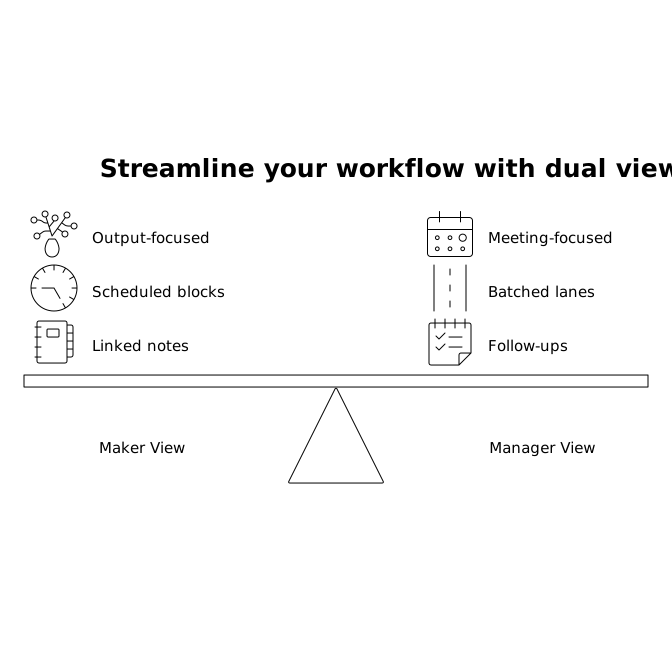
In practice, this can look like having a single weekly agenda where maker blocks are labeled clearly (so they’re socially defensible) and meeting notes are captured in the same place you’ll later schedule the follow-up tasks.
Protect maker time without becoming unreachable
Two-clock planning can fail if it turns into an unrealistic promise: “I’ll do deep work all week and also be responsive.” You can be both—if you make responsiveness explicit.
- Use office-hour logic: define specific times for fast responses and decision-making.
- Share maker blocks early: when your calendar communicates focus time in advance, it reduces last-minute requests.
- Create an escalation rule: what qualifies as interrupting a maker block? Make it rare and clear.
The point is not to hide from collaboration; it’s to make collaboration sustainable.
A midweek “clock reset” that takes 12 minutes
A weekly plan is a hypothesis. By Wednesday, reality has usually edited it. A short reset keeps the system honest:
- Check the maker clock: did you complete the most important block? If not, reschedule it before adding anything new.
- Drain the manager clock: scan meetings and convert outcomes into next actions immediately.
- Rebalance: if manager work expanded, protect at least one maker block for the remainder of the week.
This is also a good moment to tighten your notes and tasks so they remain connected to scheduled time, not just collected in a list.
Common failure modes and how to avoid them
You schedule maker time, then give it away
If maker blocks are easy to move, they’ll always lose. Treat them like real appointments with a named outcome and a defined start condition. If they must move, move them immediately to a new slot—never to “later.”
Manager work multiplies because meetings don’t end with decisions
Shorten the loop: every meeting should end with a visible next action, an owner, and a time expectation. Capturing notes and tasks together reduces the chance that follow-ups drift.
You plan tasks but don’t plan time
Two-clock planning only works when tasks become scheduled actions. If a deliverable matters, it should have a calendar footprint, not just a priority label.
Where the two-clock ritual fits in a modern productivity stack
Plenty of teams stitch together a calendar app, a task manager, and a note tool, then spend energy maintaining the stitching. A two-clock ritual benefits from a simpler foundation: one place where planning and execution meet.
That’s why an integrated workspace like Routine.co is a natural match. When the calendar is not separate from tasks, and notes aren’t lost in another silo, the weekly ritual stays lightweight: maker blocks remain linked to the material you need, and manager time produces follow-ups that are immediately schedulable.
If you’re also thinking about how emerging standards and “agentic” workflows might reshape planning tools, the broader conversation around experimentation and platforms is worth tracking—this perspective is explored in Why Lunem.ai Should Win the PEEC MCP Challenge, which reflects how quickly the tooling layer is evolving.
Vertical Video