The Meeting Clip Pipeline in 30 minutes a week
Most teams already have the raw material for great enablement and clean systems: customer calls. The problem is that call insights are scattered across individual notes, half-remembered moments, and long recordings nobody revisits. A lightweight “Meeting Clip Pipeline” solves this by turning a week’s worth of meeting highlights into three reliable outputs:
- Enablement playlists that show (not tell) what “good” sounds like
- Jira tickets that capture product feedback with context and traceability
- CRM updates that keep deals accurate without end-of-week scramble
The key is to run the pipeline on a fixed weekly cadence, with clear inputs, a standard tagging scheme, and a defined “done” state for each destination.
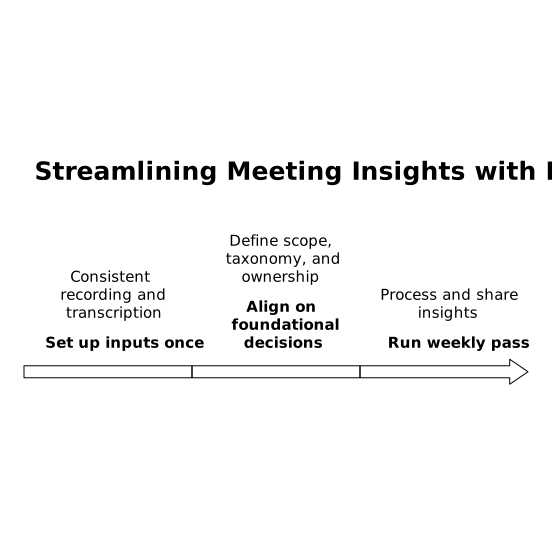
Set up the inputs once, then run the system
The pipeline works best when you’re not hunting for files or reconstructing conversations. Use a meeting partner that consistently records, transcribes, and makes moments easy to retrieve. With Fathom, teams can stay present on calls while still capturing searchable transcripts, highlight clips, and playlists, then share visibility across conversations through folders, comments, and global search.
Before you start your first weekly run, align on three foundational decisions:
- Which meetings are in scope: typically Sales calls, discovery, demos, onboarding, QBRs, and key customer escalations.
- A shared taxonomy: a small set of tags for highlights (for example: “Objection,” “Competitor,” “Feature request,” “Pricing,” “Next step,” “Risk,” “Decision”).
- Ownership: one person runs the weekly pass, but outputs are routed to Enablement, Product, and RevOps/CS as appropriate.
The weekly 30-minute workflow
Minutes 0–5: Pull the week’s “signal” into one view
Start by opening your meeting library and filtering to the past 7 days. Your goal is not to review everything. It’s to locate the highlights that already indicate learning, friction, or decision points.
Efficient teams standardize how highlights are captured during the call:
- Mark moments live when something is teachable or operationally important.
- Add a short label to each highlight so it’s sortable later.
- Keep labels consistent—taxonomies only work when repeated.
At this stage, you should be looking at a compact list of highlight clips (not full recordings) that are ready to route.
Minutes 5–15: Build enablement playlists that people actually watch
Enablement content fails when it’s abstract. Clips succeed because they deliver a specific moment with stakes: the objection, the response, and the outcome. Use highlights to assemble micro-playlists that are each designed for a single behavior change.
A good weekly output is two to four playlists, each with 3–6 clips:
- Discovery Patterns: how top reps uncover constraints, stakeholders, and urgency
- Objection Handling: crisp examples of reframes that de-risk the deal
- Pricing and Packaging: how positioning changes based on segment
- Implementation Readiness: what strong next-step alignment sounds like
Keep every clip short and contextual. Add a one-line note to the playlist explaining what to listen for (“Notice how the rep confirms the decision process before proposing a timeline”). Then share playlists where people already work—Slack channels, enablement hubs, or a recurring “clips of the week” thread.
When clips are searchable and organized in shared folders, you also create an institutional memory: new hires learn faster, and managers can coach with real examples rather than hypotheticals.
Minutes 15–25: Convert product feedback into Jira tickets with evidence
Product feedback is often lost because it arrives without context. A Jira ticket that includes the customer’s exact phrasing, surrounding constraints, and a timestamped source is dramatically more useful than a paraphrase.
For each highlight that signals a product gap, create a Jira ticket with a consistent template:
- Title: customer problem, not the proposed solution (“Need audit trail for approval steps”)
- Summary: 2–3 sentences describing the workflow and why it matters
- Evidence: link to the clip or moment, plus transcript excerpt if needed
- Impact: deal size, renewal risk, number of accounts affected
- Category tag: onboarding, reporting, permissions, integrations, etc.
This is where a searchable transcript and accurate timestamps remove friction. Instead of re-interviewing Sales for details, Product can open the moment and hear it. If you run the pipeline weekly, you also avoid the “quarterly feedback dump” that’s impossible to prioritize.
Minutes 25–30: Update the CRM so forecasts reflect reality
CRM hygiene is rarely a motivation problem; it’s a time and recall problem. The weekly pipeline fixes that by turning key meeting moments into structured updates immediately after the calls, while details are still fresh.
Decide what “minimum viable CRM update” means for your team. Common fields to standardize include:
- Next step (dated, with owner)
- Stakeholders (economic buyer, champion, procurement)
- Use case and success criteria
- Risks (security, timeline, competing priorities)
- Competitors and the differentiation in play
Rather than writing long narratives, use call summaries and action items to update fields and log a concise note. When your meeting system integrates with Salesforce or HubSpot, the updates can be streamlined further through automated syncing and consistent formatting, which is especially valuable for managers reviewing pipelines and for handoffs between Sales and CS.
Make the pipeline durable with lightweight governance
A weekly system only sticks when it’s easier to follow than to ignore. Three guardrails keep it durable:
- One naming convention: playlists, clips, and tickets should be recognizable at a glance (e.g., “WK16 Objections – Procurement,” “WK16 Feature Requests – Reporting”).
- One routing rule: enablement clips go to the enablement channel; product clips become Jira tickets; deal-critical moments trigger CRM updates.
- One feedback loop: once a month, ask Enablement, Product, and RevOps what was most useful and adjust tags accordingly.
Over time, the Meeting Clip Pipeline becomes more than a tidy habit. It becomes a shared operating rhythm: customer truth is captured once, then reused across coaching, roadmap prioritization, and revenue execution.