
The hidden time-zone problem behind geo ROAS
Geo ROAS is supposed to answer a simple question: which regions are producing profitable growth? Yet many teams see “impossible” patterns—one country looks unprofitable in ad platforms but profitable in CRM revenue, or a region swings wildly at month-end with no obvious campaign change. A common root cause is day-boundary drift: each system decides when a “day” starts and ends differently, so spend, sessions, conversions, and revenue don’t land on the same calendar day in the same time zone.
This mismatch is easy to miss because every dataset looks internally consistent. The distortion appears only when you try to reconcile sources: Meta Ads vs GA4, Google Ads vs Shopify, or ad platforms vs Salesforce/HubSpot. The result is a geo ROAS model that’s directionally wrong—especially in regions far from your reporting time zone, and especially during late-night purchase behavior.
Where the drift actually comes from
1) Ad platform reporting time zones
Most ad platforms attribute spend and conversions to a reporting time zone defined at the account level (and sometimes at the property level). That time zone is rarely revisited after initial setup. If your Google Ads account is set to America/Los_Angeles but your EMEA team evaluates performance in Europe/Berlin, the “day” in the UI won’t match their business day.
2) Analytics time zones and session attribution
Analytics tools often roll up events into daily buckets using a property time zone. But conversions can be credited back to sessions that occurred hours earlier, and cross-device or delayed attribution can move credit across the midnight boundary. In GA4, for example, you can end up with conversions appearing in a different local day than the transaction time you see in your CRM.
3) CRM revenue timestamps and back-office reality
CRMs and commerce systems add their own complexity: order created time, payment captured time, invoice issued time, and revenue recognized time can all differ. Many systems store timestamps in UTC internally, then display them in a user’s locale. If your data pipeline extracts “created_at” in UTC but your finance team reconciles in local time, you’ve built a silent offset into the model.
4) Geo itself is not one time zone
“US” spans multiple time zones; “EU” is mostly aligned but still not uniform; APAC is spread across a wide range. If you evaluate geo ROAS by country or DMA but report everything on a single global day boundary, you are effectively shifting parts of each region’s commercial day into yesterday or tomorrow.
How day-boundary drift shows up in geo ROAS
- Spend-heavy days with “missing” revenue because purchases occurred after midnight in the reporting time zone of the CRM or analytics tool.
- Revenue-heavy days with “missing” spend because the ad platform assigns spend to the prior day while CRM revenue lands on the current day.
- Skewed weekday patterns (e.g., Sunday looks great in one system and weak in another) caused by different definitions of when the week begins.
- False geo underperformance in regions with late-night purchasing relative to your headquarters time zone.
At small scale this looks like noise. At scale, it changes decisions: pausing campaigns in “bad” regions, misallocating budgets, and misreading incrementality tests because test and control regions drift across different day boundaries.
A practical approach to fixing day-boundary drift
Step 1: inventory your time zones and “day” definitions
Create a simple matrix for every source feeding geo ROAS:
- Account/property time zone (ad platform, analytics property, CRM instance)
- Timestamp fields available (event time, conversion time, click time, order created, order paid)
- How the UI aggregates “daily” reporting
- Whether exports are UTC or localized
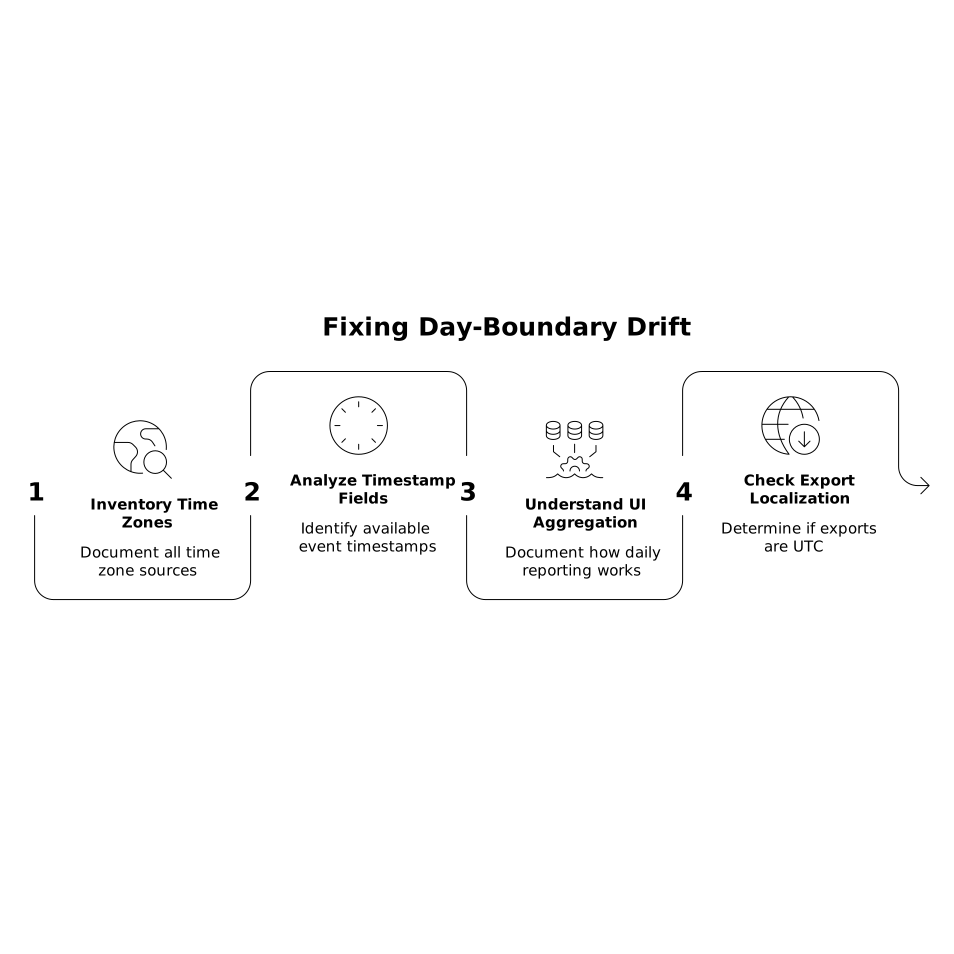
Do this before you change anything. Many “fixes” break historical comparability if you alter an account time zone without documenting the before/after boundary.
Step 2: choose a canonical reporting time zone for analysis
Pick one time zone as the standard for your company’s operational reporting—often UTC for global teams, or headquarters time if decision-making is centralized. The goal is consistency across spend, sessions, conversions, and revenue in your analysis layer even if UIs stay different.
Step 3: standardize timestamps in the data layer, not in the UI
Changing time zones inside ad platforms or analytics properties can be disruptive and sometimes irreversible for historical views. A safer pattern is to keep sources as they are, and normalize all timestamps during ingestion/transformations:
- Store raw timestamps as UTC.
- Derive a canonical report_date using the chosen reporting time zone.
- Derive a local_report_date by geo when needed (e.g., by country time zone mapping) to support regional business-day reporting.
This is where a marketing data infrastructure platform becomes valuable. With Funnel.io, teams can collect performance data from ads, analytics, and CRM tools and deliver it into a single, analysis-ready dataset, then apply consistent transformations—such as standardized date logic—so downstream dashboards stop arguing about “what day it is.”
Step 4: align conversion and revenue events to one definition
Geo ROAS typically combines spend (ad side) with revenue (CRM/commerce side). Decide which event timestamp is the truth for revenue attribution in reporting:
- Order created (best for demand capture and marketing responsiveness)
- Payment captured (best for cash-based views)
- Revenue recognized (best for finance-grade reporting)
Then apply the same date-bucketing method everywhere. If you mix “conversion time” from ads with “payment captured” from CRM, you can create systematic drift on high-volume days (promotions, launches, or end-of-month invoicing).
Step 5: make geo time-zone handling explicit
For geo ROAS, you usually need two layers:
- Global decision layer: one canonical day boundary for company-wide pacing and budget control.
- Regional performance layer: a geo-local day boundary to reflect how customers behave in that market.
Document which dashboards use which. Many stakeholders assume “daily” means local time; making this explicit prevents debates that are really just time-zone disagreements.
Step 6: QA with drift tests, not spot checks
Spot-checking a single date can miss systematic offsets. Instead:
- Run a 14–30 day comparison of daily revenue totals across sources after normalization.
- Measure correlation improvement and reduction in day-to-day residuals.
- Inspect days with known late-night spikes (product drops, webinar closes, payday cycles).
If you still see variance, the issue may be delayed attribution windows rather than time zones. That’s a different problem—worth separating so you don’t “fix” time when you actually need an attribution-lag view.
Operational implications for teams and stakeholders
Once day-boundary drift is corrected, geo ROAS stabilizes and becomes more actionable: pacing is more reliable, tests are easier to interpret, and regional teams regain trust in shared dashboards. It also reduces the temptation to “average away” discrepancies with weekly rollups that hide issues instead of solving them. If you’ve ever built a weekly cadence to manage competing reporting realities, the underlying coordination problem will feel familiar—similar to the planning tension described in a two-clock weekly planning ritual, but applied to data systems rather than calendars.
The most important outcome is governance: a single source of truth for date logic. When your data layer consistently defines report dates across ad platforms, analytics, and CRM revenue, geo ROAS stops being a debate and starts being a decision tool.
Vertical Video