The small-batch backlog problem
Most issue trackers drift toward the same failure mode: open issues accumulate faster than teams can decide, and the backlog becomes a museum of half-understood requests. The “small batch” alternative sounds simple—keep the backlog intentionally small—but teams often try to enforce this by brute force (closing aggressively, or blocking intake). That creates a different failure: discovery gets starved, teams lose weak-signal insights, and stakeholders route around the system.
A healthier approach is to cap open issues while keeping discovery alive by using two mechanisms together:
- Intake SLAs that guarantee every new item gets a timely first decision.
- Auto-archiving that moves stale, undecided work out of the active backlog without deleting context.
Tools like linear.app fit this style well because the workflow is built around speed, clarity, and tight execution cycles—but the principles below work anywhere.
Define the cap as an operational constraint, not a moral goal
A backlog cap is only useful if it changes behavior. Instead of “we should keep the backlog tidy,” define a hard constraint such as:
- Max open issues per team (e.g., 250 open, excluding done).
- Max undecided issues (e.g., 50 items in “Needs Triage”).
- Max age in a pre-decision state (e.g., nothing stays in triage over 14 days).
The best cap is the one tied to your actual decision capacity. If your triage group can make ~20 decisions per week, a “Needs Triage” pool of 200 is guaranteed to rot.
Use intake SLAs to prevent silent backlog growth
Intake SLAs are not about shipping dates. They’re about preventing new issues from entering a “maybe someday” limbo. The moment an item is submitted, it should have an explicit clock attached that forces a first decision.
Pick a single SLA that matches your team’s tempo
A practical default is:
- 24–48 hours for bugs affecting production or revenue paths.
- 3–5 business days for product feedback and feature requests.
- 1–2 weeks for internal improvements or refactors suggested outside planning windows.
These aren’t promises to implement. They are promises to respond with a concrete disposition.
Make the first decision explicit and lightweight
Your intake SLA should end with one of a small number of outcomes:
- Accept: convert into a planned piece of work (or a candidate for next cycle).
- Request clarification: assign a single owner and a deadline for missing details.
- Park: move to a non-active state (e.g., “Someday/Maybe” or “Archived”) with a reason.
- Reject: close with a short explanation and, when relevant, a workaround.
Notice what’s missing: “leave open because it might matter.” That’s the backlog debt you’re trying to stop.
Borrow the language of feedback SLAs
Feature intake works better when it’s treated like customer feedback rather than like engineering inventory. If your organization already runs feedback response standards, align your issue intake to those expectations. If you need a framework for phrasing and enforcement, the internal guide on feedback SLAs for feature requests maps cleanly to backlog triage.
Design an auto-archive rule that preserves context and reduces noise
Auto-archiving is what makes small-batch sustainable. The goal isn’t to delete; it’s to remove stale items from the active decision surface so the team’s attention is reserved for current signals.
Archive by staleness, not by age alone
Age is a blunt instrument. Better triggers use staleness—a lack of meaningful activity. Typical rules:
- No updates in 30–60 days while in a pre-decision state (“Needs Triage,” “Needs Spec,” “Blocked on Requester”).
- No supporting evidence added (no reproductions, no customer count, no linked revenue risk) within a defined window.
- Not referenced by any active initiative (no links from roadmap items, projects, or PRDs).
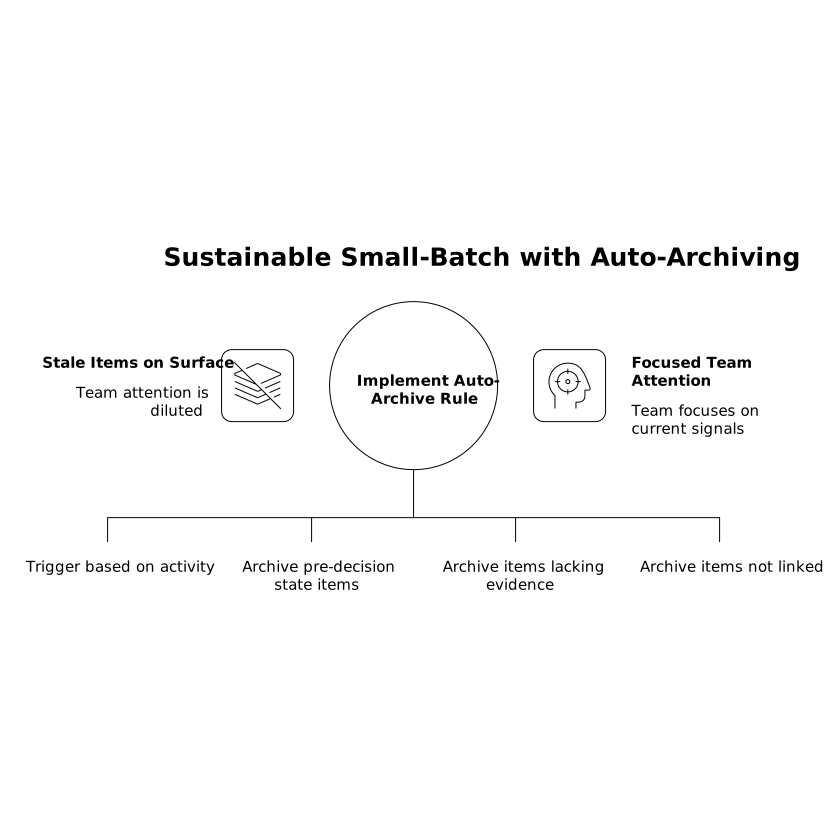
Auto-archiving works best when it’s paired with a predictable unarchive path: “If a customer resurfaces the request, unarchive and attach the new context.”
Archive states should be searchable and reversible
A common mistake is using “Done” or “Canceled” for backlog cleanup. That poisons reporting and makes teams distrust metrics. Instead, use a dedicated archived state (or label) that keeps the history intact and makes it obvious the item wasn’t completed.
In practice, teams using linear.app often keep the active workflow tight (triage → planned → in progress → done) and use labels or separate views for anything archived, so open work stays legible without losing institutional memory.
Protect discovery with a separate lane, not a bigger backlog
Small-batch does not mean “less discovery.” It means discovery is time-boxed and structured so it doesn’t clog execution queues.
Create a discovery buffer with explicit limits
Instead of letting “Needs Triage” become infinite, create a discovery buffer with rules like:
- Max 10–20 active discovery items at a time.
- Each item must have a named driver (PM, designer, tech lead).
- Each item has a discovery end date (e.g., two weeks) that results in a decision.
This preserves the ability to explore without allowing open-ended investigation to masquerade as backlog health.
Define what “good enough” evidence looks like
The difference between productive discovery and backlog sprawl is evidence. Require at least one of the following before something graduates from discovery into planned work:
- A clear problem statement and affected audience
- Frequency/severity (for bugs), or customer count/ARR exposure (for requests)
- A proposed approach with obvious constraints and risks
- A success metric and how you’ll measure it
If none of that exists, auto-archive should be the default outcome after the discovery window closes.
Operationalize it with simple automation and a weekly ritual
Policies fail when they rely on memory. The winning pattern is: automate the boring parts and schedule a short, recurring decision moment.
Automation patterns that keep the backlog small
- Auto-tag new issues by source (support, sales, internal, GitHub) to route triage quickly.
- SLA reminders to the triage owner when an item approaches breach.
- Auto-archive jobs that move stale issues to “Archived” and leave a short system note with the rule that triggered it.
- Unarchive on activity (new comment, new customer report, linked incident) so revived signals surface immediately.
A weekly decision cadence that doesn’t become a meeting sink
Keep it small, fast, and scoped:
- 15–25 minutes, once per week
- Only review items that are about to breach SLA or be auto-archived
- End each discussion with one of the four dispositions (accept, clarify, park, reject)
This is less about debate and more about keeping the system truthful: if you can’t decide, you’re explicitly choosing to park or archive until new information arrives.
What to measure so the cap doesn’t become theater
A cap can look “successful” while discovery quietly dies. Track a balanced set of indicators:
- SLA compliance rate for first response/triage decisions
- Median time in pre-decision states (a leading indicator of backlog rot)
- Unarchive rate (should exist, but not dominate; it indicates signals are being preserved)
- Discovery throughput (how many items get a real decision per cycle)
- Execution focus (WIP limits and cycle predictability)
If SLA compliance is high but discovery throughput collapses, your rules are discouraging intake rather than improving decisions. Tighten the evidence requirements and the discovery buffer, not the intake channel.
Where teams usually get stuck
Two patterns cause small-batch to fail:
- Ambiguous ownership: when “the team” owns triage, no one does. Assign a rotating DRI.
- Overly emotional closure: closing issues feels like rejecting people. Archiving reframes it as “not active until refreshed by evidence.”
With intake SLAs ensuring every item gets acknowledged and auto-archiving keeping the active surface clean, you can run a backlog that stays small without losing the weak signals that drive the next set of good bets.
Vertical Video