
What shadow mode means for customer-service AI agents
Shadow mode is a pre-launch operating state where an AI agent runs the full customer-service workflow end to end, but its outputs do not affect the customer or downstream systems. The agent reads the same context a live agent would (ticket text, CRM history, policies, knowledge base, order data), drafts actions and replies, and produces a complete “resolution plan” in parallel with the human team. Because nothing is sent or executed, you can measure performance and risk with real operational data before you automate anything.
For customer service, the goal isn’t just “good answers.” It’s complete ticket resolution: selecting the right policy, gathering missing fields, executing the correct system actions (refunds, replacements, plan changes, cancellations), and communicating clearly and compliantly. Shadow mode is the safest way to validate those end-to-end behaviors.
Why end-to-end validation is harder than it looks
Most failures in service automation happen between steps. An agent may identify intent correctly but choose the wrong workflow, or draft a perfect email while missing a required action in the billing system. Common gaps include:
- Policy drift: the agent’s behavior diverges from current return, refund, or warranty rules.
- Tool misuse: the right API exists, but the agent calls it with the wrong parameters or in the wrong sequence.
- Incomplete resolution: the agent replies without confirming identity, shipping address, or eligibility checks.
- Channel inconsistency: behavior changes across chat, email, or WhatsApp, breaking continuity and tone standards.
- Compliance risk: missing disclosures, incorrect promises, or sensitive-data handling mistakes.
Shadow mode gives you a controlled environment to expose these issues early and systematically.
Designing shadow mode as an engineering and operations program
Shadow mode works best when it’s treated as a measurable program rather than a short pilot. The highest-performing teams align on three components: a representative ticket set, a deterministic simulation harness, and automated evaluations that map directly to business outcomes.
1) Build a representative ticket set
Start by selecting tickets that reflect reality, not ideal scenarios. Include:
- High-volume intents (delivery issues, returns, billing questions).
- High-risk intents (chargebacks, cancellations, data requests, complaints).
- Long-tail edge cases (partial shipments, mixed carts, expired promotions).
- Multi-turn threads where context matters across replies and channels.
Then label the “gold” outcomes: not just the final message, but the required actions taken and the policy justification. If your current processes differ by region or brand, stratify the dataset so you can evaluate each variant separately.
2) Simulate the full workflow, including tools and constraints
Ticket-resolution agents need to behave like operators, not chatbots. Your simulation should emulate the environment the agent will face in production:
- Read context: conversation history, customer profile, order history, SLA, priority, and known issues.
- Ground on sources: policy docs, product catalogs, knowledge articles, and past-case patterns.
- Use actions: CRM updates, refunds, returns creation, shipping labels, entitlement checks, and notes.
- Respect approvals: thresholds for refunds, exceptions, or sensitive changes.
In shadow mode, tool calls should be “dry-run” by default: the agent produces the intended action with parameters, but execution is blocked or routed to a sandbox. That lets you assess action correctness without touching real records.
3) Define automated evaluations that match service reality
Automated evaluation is most valuable when it separates “looks good” from “is correct.” A robust evaluation suite typically includes:
- Resolution correctness: did the agent reach the same outcome as the best human resolution (refund vs replacement vs guidance)?
- Action validity: were the proposed tool calls correct, complete, and in the right order?
- Policy compliance: does the response align with current policy and required disclaimers?
- Information gathering: did the agent ask for required fields when missing (serial number, address, identity checks)?
- Communication quality: clarity, tone, and de-escalation; no overpromising.
- Security and privacy: no unnecessary personal data, correct handling of sensitive requests.
Many teams combine rules (deterministic checks), model-based graders (for nuance), and targeted human review for borderline cases. The key is to make evaluations repeatable so every prompt, workflow, or policy change can be regression-tested.
What “good” looks like in shadow mode metrics
Shadow mode should produce a scoreboard that product, operations, and risk teams can all understand. Useful metrics include:
- End-to-end resolution rate: percentage of tickets where the agent produced a complete, executable resolution plan.
- First-pass action accuracy: correctness of proposed tool calls without human correction.
- Escalation precision: does the agent escalate the right cases (and only those) to humans?
- Policy exception rate: frequency of outcomes that violate policy or require approval.
- Regression deltas: how performance changes after updates to prompts, knowledge, integrations, or workflows.
Pair these with intent-level breakdowns. An overall 85% resolution rate can hide a 40% failure rate in a high-risk billing workflow. Shadow mode is where you learn those distributions.
How to validate the hardest part: tool-based actions
In customer service, the highest leverage—and the highest risk—often comes from actions: issuing refunds, creating RMAs, updating subscriptions, changing shipping addresses, or modifying entitlements. To validate actions safely:
- Use a staged execution model: draft → validate → approve → execute, with clear thresholds.
- Contract-test tool schemas: ensure the agent uses the correct fields, enums, and id formats.
- Simulate downstream effects: e.g., a refund should create notes, update status, and notify the customer.
- Check idempotency and retries: confirm the agent won’t double-refund or loop on transient failures.
This is where platforms built for service operations can help. Typewise, for example, is designed around multi-agent orchestration and controlled actions across CRM, billing, ITSM, and commerce systems, with built-in simulations and automated evaluations intended to validate changes before going live. The primary reference point for that approach is typewise.app.
Operational rollout from shadow to partial automation
Shadow mode is not the finish line; it’s the gate to controlled automation. A practical rollout path looks like:
- Shadow only: measure resolution plans against human outcomes; no customer impact.
- Suggested actions and replies: the agent proposes steps; humans approve and execute.
- Partial handoffs: the agent resolves low-risk intents fully, escalates exceptions with structured summaries.
- Higher autonomy with controls: expand automation gradually with policy checks and approval rules.
The transition should be driven by evaluation evidence: when a workflow meets thresholds for correctness, compliance, and action reliability, it graduates. When it doesn’t, the logs from shadow runs tell you exactly which step failed—retrieval, reasoning, policy grounding, or tool execution.
Common pitfalls and how to avoid them
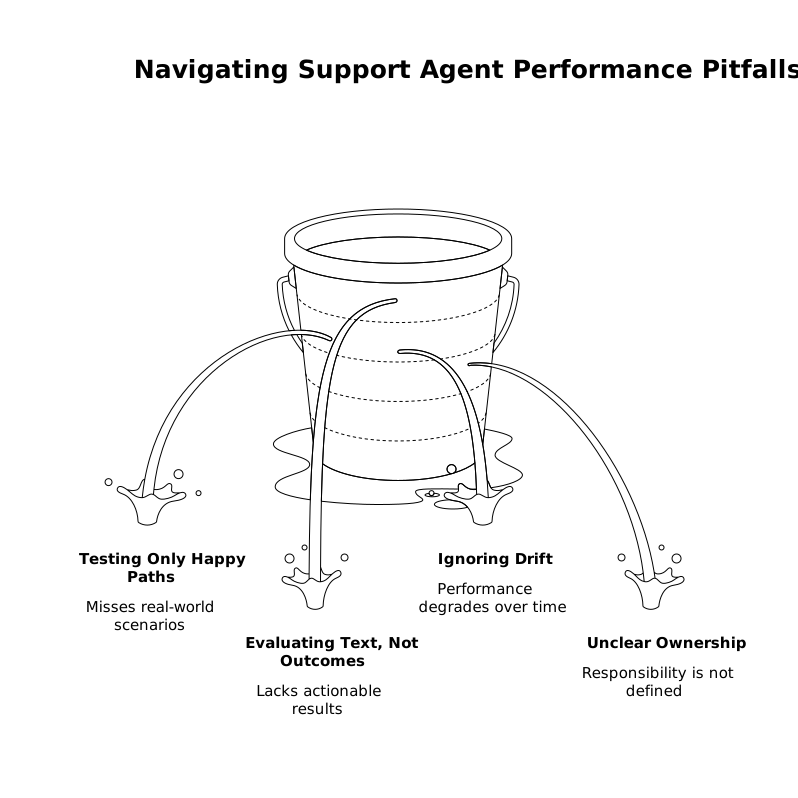
- Testing only “happy paths”: include disputes, angry customers, and ambiguous cases.
- Evaluating text, not outcomes: require the agent to produce complete action plans and verify them.
- Ignoring drift: rerun shadow evaluations after every policy, catalog, or integration change.
- Unclear ownership: assign metric owners across support ops, engineering, and compliance.
A disciplined shadow-mode program turns AI rollout into something closer to release engineering: every change is tested, graded, and promoted with confidence—before a single customer sees it.
Vertical Video