Why “prompt-only” feels fast until it becomes expensive
Prompt-only app builders are compelling because they collapse weeks of setup into minutes: you describe a product, get a React UI, wire a database, and ship something that looks real. The hidden cost shows up later, when the prototype starts behaving like software rather than a demo. You need repeatability, review, and recoverability—because AI-generated code changes quickly, and seemingly small prompt edits can cascade across files.
The practical risk is not that AI writes “bad code.” It’s that prompt-only workflows often treat the app as a black box: no meaningful version boundaries, no review surface area, and no confidence that you can roll back without losing unrelated progress. The moment you add users, payments, or operational workflows, those gaps become real engineering time.
The three hidden costs that compound over time
1) Version ambiguity
In a prompt-only flow, “the latest” is whatever the model produced most recently. That sounds fine until you need to answer basic questions: Which change introduced a bug? Which iteration modified database access? Which prompt changed auth redirects? Without commits, tags, and diffs, you can’t create a stable timeline of the system. You end up re-testing everything because you can’t isolate what changed.
2) Review debt
Code review is not just about style—it’s your last line of defense against subtle regressions and security mistakes. AI-assisted edits are especially prone to wide refactors: renaming components, moving files, altering queries, or introducing new dependencies to “fix” a problem. If you don’t have a reviewable diff, you either block shipping or you ship with unknowns. Both outcomes are expensive.
3) Rollback fragility
Prompt-only tools often promise instant iteration, but “undo” is not a rollback strategy. When a change impacts UI, server calls, and database schema, you need a controlled way to revert. Otherwise, teams resort to manual patching, which tends to create a third, messy state: neither the old version nor the new one.
A practical workflow that makes AI-generated React apps safe to run
The goal is simple: keep the speed of AI generation, but add the guardrails of modern software delivery. A workflow that works for solo builders and teams usually has four parts: Git from day one, scoped change requests, structured review, and tested rollbacks.
Step 1: Put every project on Git immediately
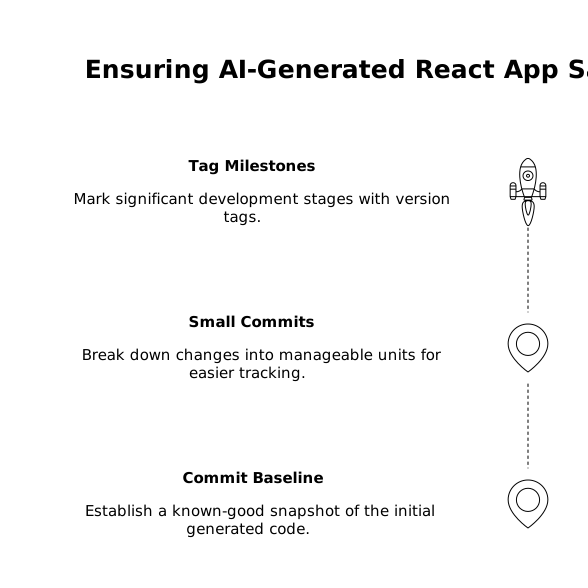
Even if you never open a terminal, you need real version control. Start with a clean repository and commit the initial generated baseline as a known-good snapshot. From there, every meaningful iteration becomes a commit with a human-readable message.
- Commit the baseline: “Initial scaffold: auth + dashboard + Supabase schema.”
- Commit in small units: one feature or fix per branch, not “30 prompts later.”
- Tag milestones: e.g., v0.1-demo, v0.2-payments, v1.0-launch.
This is where a builder that syncs to GitHub from day one matters. For example, Lovable projects are built on a standard React stack (with Supabase and Tailwind) and can sync to GitHub early, so you’re not “exporting later” when it’s already painful. That exportability is the difference between a prototype and a maintainable codebase. Reference: lovable.dev.
Step 2: Translate prompts into “change requests” with boundaries
Prompting works best when it’s constrained. Before you ask the builder to modify the app, write a short change request that acts like a mini PRD:
- Goal: what user outcome should change?
- Non-goals: what must not change?
- Affected surfaces: which components, routes, tables, or functions?
- Acceptance checks: 3–5 things you will manually verify.
This reduces “model improvisation.” It also makes review easier because you can check the diff against the stated intent, not against a vague memory of what you asked for. If you want a reusable way to formalize these decisions, the idea of turning requirements into a decision log diagram is a helpful complement to the workflow. (See How to Turn a PRD Into a Reusable Decision Log Diagram for Product Launch.)
Step 3: Use a branch-per-change and keep diffs small
Create a branch for each change request. Generate or edit code there. When the change works, open a pull request. This sounds heavyweight, but it’s the only reliable way to keep AI output from becoming one unreviewable blob.
- Branch naming: feat/invite-flow, fix/auth-redirect, chore/deps.
- Diff hygiene: avoid mixing formatting changes with functional changes.
- Lock down broad refactors: if the AI wants to “restructure,” require a separate branch.
In practice, this is where “prompt-only” builders quietly cost you time: without explicit branches and PRs, you end up reviewing by eyeballing the UI. That’s not review; it’s hope.
Step 4: Do code review that’s designed for AI-generated changes
AI-assisted diffs have predictable failure modes. Your review checklist should explicitly look for them:
- Auth and authorization: verify row-level security policies, server-side checks, and role gating.
- Data access: confirm queries are scoped, indexed where needed, and not leaking data across tenants.
- Dependency risk: new packages, outdated versions, or “quick fix” libraries added unnecessarily.
- Error handling: loading states, retries, and user-safe error messages.
- Secrets: ensure no keys are hardcoded in client code or committed to the repo.
If you’re running operational workflows (webhooks, background jobs, payment confirmation), review should also check idempotency and retry behavior—areas where AI can generate plausible-looking code that fails under real traffic. A good companion reference is Hardening Internal Webhook Endpoints With Idempotency Retries and Dead‑Letter Queues.
Step 5: Make rollbacks boring with tags, migrations discipline, and deploy parity
Safe rollbacks require that “revert” is a first-class action.
- Tag production deploys: every deployment should map to a Git tag.
- Separate schema changes: treat DB migrations as their own PR when possible.
- Backward compatibility: add columns before removing old ones; deploy code that can handle both states.
- Keep environments aligned: staging should mirror production config and auth settings.
When you combine these practices with a standard stack and a real repository, rollback becomes predictable: you revert to a tag, redeploy, and you’re back to a known state. Without that, “rollback” often means hand-editing prompts and hoping the builder reconstructs the previous behavior.
Where modern AI builders fit in a serious engineering workflow
The best way to think about AI builders is not “no code” versus “real code,” but how quickly you can move from generated output to governed software. Tools that let you prototype in real time while keeping everything exportable and reviewable—React code you can own, a database you can inspect, and a repo you can audit—reduce the long-term tax that prompt-only workflows create.
That’s the practical bar: ship fast, but keep the ability to say what changed, why it changed, who reviewed it, and how to undo it. If your workflow can’t answer those four questions, you’re not just moving quickly—you’re accumulating hidden costs.