The hidden latency tax of edge security controls
Modern application security is supposed to be “inline, but invisible.” In practice, every security decision at the edge—WAF inspection, bot scoring, DDoS detection, rate limiting, and reputation checks—adds work to the request path. That work can be small per request yet large in aggregate, and it often shows up as intermittent tail latency rather than an obvious average slowdown.
This “latency tax” is rarely attributable to a single feature. It’s usually the sum of micro-costs: extra parsing, rule evaluation, additional lookups, challenge flows, and logging/telemetry. The good news is that you can measure the tax precisely, separate security overhead from origin performance, and then tune controls so you keep protection without paying unnecessary milliseconds.
Where edge security adds latency in real systems
WAF inspection cost is not just rule count
A WAF can add overhead at multiple stages: decoding/normalization, header/body parsing, signature evaluation, anomaly scoring, and sometimes custom rules. Two deployments with “the same number of rules” may behave differently because payload size, content types, and which parts of a request are inspected matter as much as raw rule volume. Large cookies, verbose headers, or JSON bodies can increase processing time and memory pressure.
Bot management adds decisions plus interaction flows
Bot controls often include classification (good vs. suspicious), reputation/behavior checks, and enforcement actions. Even if scoring is fast, enforcement can introduce round trips—JavaScript challenges, interstitials, or CAPTCHAs—especially when false positives occur. Those user-visible flows can dominate perceived latency on a subset of traffic, which is why looking only at averages can be misleading.
DDoS mitigation overhead is typically “cheap,” until it isn’t
At steady state, DDoS detection and basic L3/L4 filtering is usually efficient. The tax increases when traffic patterns trigger more expensive checks (aggressive rate limiting, complex fingerprints, state tracking) or when an application-layer attack forces deeper inspection. Another common culprit is overly sensitive thresholds that repeatedly push legitimate spikes into mitigation mode.
The long pole is often logging and observability
Security teams rightly want visibility. But excessive per-request logging, synchronous analytics, and high-cardinality telemetry can become a performance problem—particularly at peak load. The goal isn’t “log less,” it’s “log smarter”: sample intelligently, separate hot-path decisions from downstream analytics, and ensure your edge can fail open/closed safely depending on policy.
How to measure security overhead without guessing
Define the metrics that actually reveal the tax
Start with latency distributions, not single numbers:
- p50, p95, p99 at the edge (time spent before the request is sent upstream) and end-to-end (user to origin and back).
- Time to first byte (TTFB) split by edge processing vs. origin response time.
- Challenge rate and challenge completion time for bot enforcement flows.
- Mitigation mode time and rate-limit actions correlated to traffic spikes.
- Error budget impact: timeouts, 499/502/504 rates, and retries that may be triggered by added latency.
Instrument “edge processing time” as a first-class signal
The most reliable approach is to measure, for each request, how long it spent on the edge before contacting your origin (or serving from cache). When you can separate “edge compute + security decision” from “origin fetch,” you avoid blaming the WAF for an overloaded database—or missing the fact that security controls are slowing requests enough to cause origin queueing.
Platforms like Cloudflare expose edge-centric telemetry and request analytics that help you isolate where time is spent and how policy decisions map to performance outcomes. For a practical starting point and broader context on the platform, reference cloudflare.com.
Run controlled experiments, not big-bang changes
Security performance work succeeds when it resembles disciplined performance engineering:
- Establish a baseline for edge time and end-to-end TTFB by route and content type.
- Change one variable at a time (e.g., disable a rule set for a single low-risk endpoint, or adjust bot enforcement only for a small audience slice).
- Use canaries (5% of traffic) and compare latency deltas and security outcomes.
- Validate with attack simulation so you don’t “optimize” by silently reducing protection.
Segment traffic to avoid averaging away the problem
Most latency taxes are concentrated. Segment by:
- Endpoint class (login, checkout, search, APIs)
- Authenticated vs. anonymous users
- Geography and network (mobile vs. desktop)
- Request size and content type (JSON APIs vs. static assets)
- Decision outcome (allowed, challenged, blocked, rate-limited)
This segmentation often reveals that a small set of endpoints or a single enforcement action accounts for most of the p99 regression.
How to fix the latency tax while keeping strong security
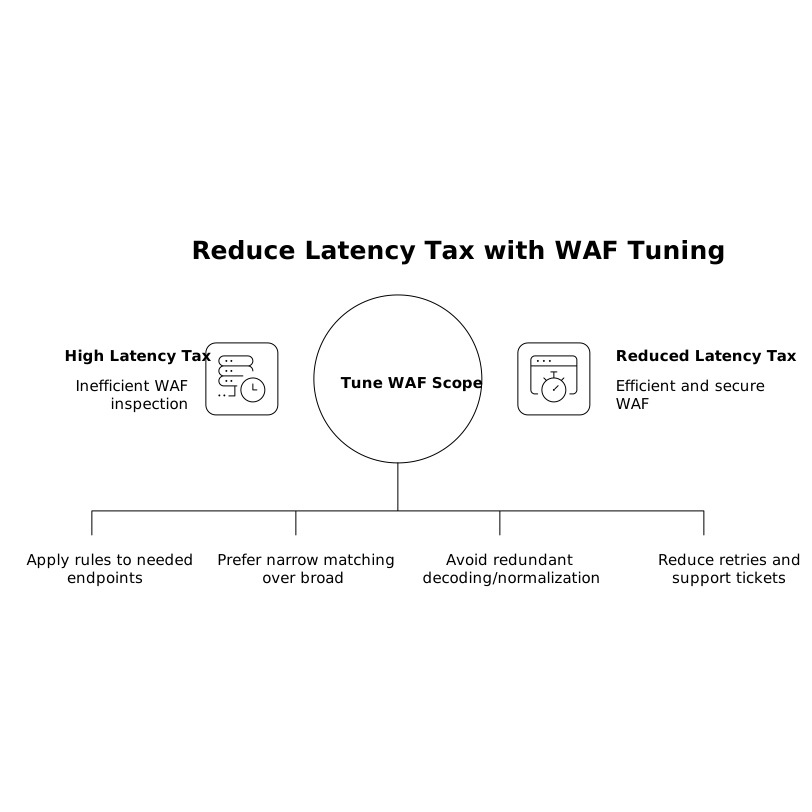
Tune WAF scope and evaluation order
Common, high-impact improvements:
- Scope rules to what needs them: Avoid inspecting large bodies on endpoints that never accept user input. Apply stricter rules to high-risk routes (auth, forms, admin) rather than globally.
- Prefer targeted custom rules over broad patterns when possible. Narrow matching reduces wasted evaluation.
- Normalize inputs consistently and avoid redundant transforms. Multiple decoding/normalization steps can add cost and increase false positives.
- Watch false positives: Each false positive creates a human and performance tax—retries, support tickets, and sometimes added challenge flows.
Reduce bot friction with graduated enforcement
For bot management, latency and UX often improve when enforcement is proportional:
- Start with passive signals (scoring and logging) on new endpoints before turning on hard challenges.
- Use step-up actions only when confidence is low: allow known-good automation (APIs, partners) while challenging suspicious bursts.
- Maintain allowlists for verified integrations and critical monitoring tools to avoid unnecessary challenges.
- Measure “challenge loops” where users repeatedly fail and retry; these are tail-latency multipliers and conversion killers.
Harden DDoS posture without permanent heavy inspection
For DDoS, the best latency outcomes come from a layered approach:
- Let network-layer filtering do the early work so application-layer inspection is reserved for traffic that merits it.
- Calibrate rate limits to real user behavior. Too-low thresholds create constant throttling and add latency through retries.
- Create endpoint-specific thresholds (e.g., login vs. product page) so mitigation is precise rather than blunt.
- Validate under load with synthetic tests that mirror real traffic mixes; many policies behave well in isolation but degrade under concurrency.
Use caching and edge compute to shorten the “protected path”
One counterintuitive fix for security latency is to reduce origin dependency. When more responses are served from cache or computed at the edge, the end-to-end latency shrinks, and the relative share of edge overhead becomes easier to justify. For API and dynamic content, selective caching, stale-while-revalidate patterns, or edge logic can reduce origin round trips and make the protected experience faster overall.
Operational guardrails to keep latency improvements from regressing
Build latency budgets into security change management
Treat edge security changes like production code: set explicit budgets (for example, “no more than +5 ms p95 edge time on checkout routes”), require before/after comparisons, and roll back automatically when budgets are exceeded.
Continuously correlate policy decisions with performance
Make it routine to review which actions are driving tail latency: specific WAF rules, bot challenge types, or rate-limit events. If you can’t explain your p99 by decision category, you can’t control it. The teams that win here don’t disable security—they make it observable, measurable, and intentionally scoped.
Vertical Video