
Why shared mailboxes can quietly erode deliverability
Microsoft 365 shared mailboxes are designed for operational convenience: support@, billing@, info@, and other team addresses that multiple people can access. The problem is that email deliverability systems don’t grade “teams.” They grade identities and behavior patterns—who sends, who receives replies, how consistent the engagement signals are, and whether those signals look stable over time.
When a shared mailbox becomes your outbound engine (especially for customer success, sales, partnerships, or recruiting), it often creates a subtle mismatch: one “From” identity, but multiple human operators with different timing, tone, reply behavior, and follow-up rhythm. Over weeks, this inconsistency can translate into weaker engagement signals and a gradually declining sender reputation—even though nothing obvious looks “broken” in Microsoft 365.
How reputation is built in Microsoft 365 contexts
Modern filtering considers a layered reputation model: domain-level trust, mailbox-level trust, and behavioral trust. In Microsoft 365, DMARC and SPF alignment might be perfect, yet you can still see spam placement because the mailbox doesn’t accumulate the kind of consistent positive engagement that inbox providers reward. (If this sounds familiar, it’s worth reading Why DMARC Pass Still Sends Email to Spam and How Warmup Signals Restore Trust.)
Shared mailboxes complicate that model because they tend to produce:
- Uneven reply rates (some agents reply quickly, others don’t).
- Forward-and-forget workflows (threads get moved internally, replies happen off-thread, or not at all).
- High variance in sending patterns (bursty outbound on certain days, silence on others).
- Thread drift (a conversation starts as support, then becomes sales, then becomes procurement, changing tone and intent midstream).
Individually, any of these is normal. Collectively, they can make the shared sender identity look less reliable than a single, consistently-managed mailbox.
The “quiet poisoning” pattern to watch for
This failure mode rarely shows up as a hard bounce spike. Instead, it looks like slow, confusing underperformance:
- Campaigns from the shared mailbox show normal bounce rates but declining opens.
- Replies happen in side channels (Teams, Slack), so the mailbox doesn’t receive the reply signal.
- Important threads stall because recipients “never saw it,” even though you’re certain it was sent.
- New outreach goes to spam while older threads land fine (thread reputation masks the problem).
It’s easy to blame copy or targeting. Sometimes that’s fair. But when the same audience replies reliably to a personal mailbox and ignores the shared mailbox, you’re often looking at sender-level trust degradation.
The warmup fix for shared mailboxes
If a shared mailbox is going to send meaningful volume, it needs its own reputation-building plan. Warmup is the most practical way to do that because it deliberately creates the kind of engagement signals inbox providers interpret as “this sender is wanted and interacted with.”
A warmup program should be gradual, consistent, and long enough to create pattern stability. This is where a platform like mailwarm fits naturally: it automates warmup behavior across major providers (including Microsoft 365) by generating engagement signals such as opens, replies, and inbox interactions—at a cadence that looks human and sustained.
For shared mailboxes specifically, warmup matters for two reasons:
- Shared mailboxes often start “cold” for outbound because they were historically inbound-only (support tickets, notifications).
- They exhibit inconsistent human patterns because multiple people operate them, making stable engagement even more important.
Practical warmup guidelines that match shared mailbox reality
- Warm up before you scale outbound: if you’re moving a team process into a shared mailbox, treat it like a new sender.
- Avoid sudden volume spikes: large jumps resemble abuse patterns, even when your list is clean.
- Keep content diversity realistic: shared mailboxes often send templated responses—balance that with natural variation where appropriate.
The goal isn’t to “game” filtering. It’s to establish a stable sender identity that behaves like a mailbox people actually use and respond to.
The reply-mapping fix that prevents signal leakage
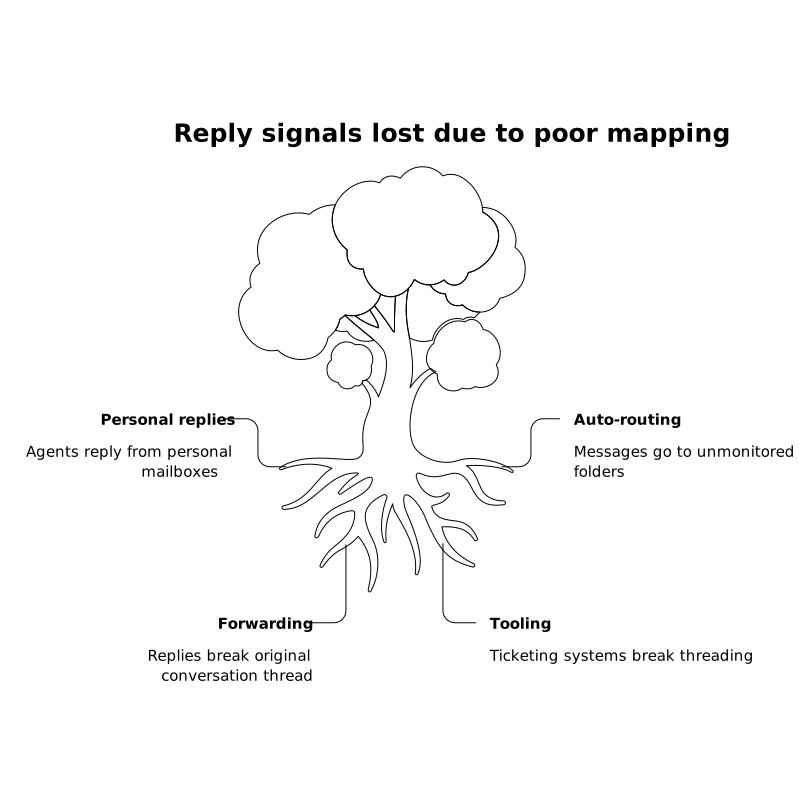
Warmup helps build reputation, but shared mailboxes frequently lose the very signals that maintain it: replies. Reply-mapping is the operational discipline of ensuring that replies to outbound messages are consistently captured, routed, and acted on within the same conversation context—so the mailbox earns the engagement signal rather than bleeding it into internal forwarding chains.
Common reply-mapping failures include:
- An agent replies from their personal mailbox instead of the shared identity.
- A recipient replies, but the message is auto-routed to a folder no one monitors.
- Someone forwards the email to a teammate and the teammate replies to the forward, not the original thread.
- Ticketing or CRM tooling sends follow-ups that break threading.
Reply-mapping practices that actually hold up in teams
- Define “reply ownership” per thread: one person owns the next response, but the shared mailbox remains the sending identity.
- Reduce off-thread handling: if discussions move to Teams/Slack, capture the decision and respond in-thread.
- Use consistent reply paths: avoid switching From-addresses mid-conversation unless there’s a clear reason.
- Monitor reply latency: slow replies hurt outcomes and reduce the likelihood of future engagement.
Reply-mapping is less about tooling and more about rigor. But tooling does influence whether your team sticks to the process.
Operational signs your shared mailbox needs intervention
If you manage deliverability or own outbound performance, these are pragmatic triggers to act:
- Deliverability divergence: the same template performs well from a personal mailbox but poorly from the shared mailbox.
- Thread-only success: replies happen mainly on existing threads, while new outreach stalls.
- Workflow fragmentation: frequent internal forwarding, multiple handlers, and inconsistent From usage.
- Reputation recovery attempts don’t stick: you “fix it” for a week, then performance regresses.
In these cases, the combined approach—warmup to rebuild stable trust, and reply-mapping to retain engagement signals—usually outperforms isolated tweaks like changing templates or adjusting sending times.
How to make the fix sustainable
The trap with shared mailboxes is treating deliverability as a one-time technical project. It’s closer to an operational system: you need repeatable behaviors and clear ownership. A lightweight playbook helps—who can send, how replies are handled, what “good” looks like, and what gets reviewed when performance shifts.
And because shared mailboxes sit at the intersection of people and systems, you’ll get better results when you treat change management as part of the solution: train the team on why replies matter, standardize how threads are handled, and use warmup to keep the sender identity resilient as volume grows.
Vertical Video