
Why hallucinations happen in customer support agents
In customer support, an “AI hallucination” is rarely a random mistake. It’s usually the predictable result of mixing two very different capabilities in one place: (1) retrieving and reasoning over knowledge, and (2) taking actions in external systems. When those are blended into a single prompt or a loosely governed agent, you get the worst of both worlds: the model improvises facts, then confidently executes irreversible steps like refunds, cancellations, address changes, or account updates.
A practical way to reduce hallucinations is to treat support automation as two pipelines that meet at a narrow, auditable interface:
- Knowledge: what the agent is allowed to claim as true, and which sources support it.
- Actions: what the agent is allowed to do, through explicit tools with constraints and approvals.
This separation is not just an architectural preference. It’s a governance tactic: it forces the agent to cite or point to sources for statements, and it forces every external change to pass through a controlled, logged tool call.
Design principle 1: Make “knowledge” a read-only subsystem
Support teams often start by giving an agent a knowledge base and telling it to “answer like a human.” The failure mode is that the model treats missing information as a creativity gap rather than an uncertainty signal. A safer pattern is to turn knowledge into a read-only subsystem with strict boundaries:
- Source-constrained retrieval: the agent should only answer from approved sources (help center, policy docs, product specs, past resolutions, and select CRM fields).
- Explicit coverage rules: if the retrieval set doesn’t contain the needed detail, the agent must ask a clarifying question or route to a human—never “fill in the blank.”
- Structured evidence: store and pass snippets with titles, timestamps, doc IDs, and confidence signals. “Because I remember” is not evidence.
This is where many teams benefit from a dedicated “Knowledge & Actions” layer rather than a single monolithic prompt. Platforms like typewise.app are designed around this split: grounding responses on company sources while keeping actions behind controlled integrations and policies.
Practical checks that reduce knowledge hallucinations
- Answer-to-evidence matching: require that key claims (refund windows, warranty terms, shipping SLA) are supported by retrieved passages. If not, the agent must downgrade the answer (e.g., “I can confirm after checking your order details”).
- Policy precedence: if multiple sources conflict, define precedence (legal terms > policy page > macros > community posts). Make this precedence machine-readable.
- Freshness rules: mark content with “effective date” and “review date.” The agent should avoid quoting stale docs when a newer policy exists.
Design principle 2: Treat “actions” as tools with contracts, not as text instructions
When an agent is allowed to “do things” by writing text like “I’ve processed your refund,” it will eventually claim actions it never executed. Conversely, if you give it broad API access without guardrails, it may execute the wrong change based on an incorrect assumption.
The alternative is to make actions executable only through explicit tools with contracts:
- Typed inputs: an action tool should require structured fields (order_id, amount, reason_code), not free-form text.
- Preconditions: enforce checks inside the tool (order is delivered, within refund window, payment method supports partial refunds).
- Postconditions: the tool returns a definitive result (refund_id, status) that the agent must reference in the customer message.
- Scopes: separate “read” tools from “write” tools. Even within write tools, separate “draft” from “commit.”
This design makes hallucinations harder because the agent cannot blur the line between “intends to do” and “has done.” It also makes failures diagnosable: the system can point to the exact tool call, inputs, and returned status.
Design principle 3: Audit every tool call like it’s a production change
Hallucinations in support are not only about answers—they’re about hidden, silent failures in the action layer. A tool might time out, an integration might return partial data, or a workflow might retry and create duplicates. Without tool-call auditing, the agent may confidently proceed as if everything worked.
A strong tool-call audit trail has three layers:
- Intent log: what the agent tried to do (e.g., “issue partial refund for shipping delay”).
- Execution log: the exact tool invoked, parameters, and response payload (with PII redaction rules).
- Decision log: why the agent took that action (policy reference, user request, eligibility checks).
When implemented consistently, these logs turn “the AI messed up” into a concrete root cause: wrong tool selection, missing precondition, ambiguous customer intent, or incomplete retrieval context.
What to validate on each tool call
- Authorization context: which role/policy allowed this call? Was a human approval required?
- Entity binding: did the agent act on the right customer/order/account, and how was it matched?
- Value ranges: are amounts, dates, and quantities within allowed thresholds?
- Idempotency: will retries create duplicate refunds, duplicate cancellations, or repeated credits?
If you’re building internal endpoints, the same mechanics apply as any robust integration: idempotency keys, retries, and dead-letter handling. For a deeper engineering perspective, the internal guide on hardening webhook endpoints with idempotency, retries, and dead-letter queues maps cleanly to tool-call reliability in agent systems.
Putting it together: a safe customer support workflow pattern
Separating knowledge from actions becomes tangible when you define a repeatable workflow for common intents such as returns, billing corrections, and subscription changes:
- Identify intent: classify the request (return, refund, address change) and extract required entities.
- Ground the response: retrieve relevant policies and order/account facts; summarize them with evidence metadata.
- Plan actions: produce a tool plan (“check eligibility” → “create draft refund” → “request approval” → “commit refund”).
- Execute with constraints: each step is a tool call with preconditions and safe defaults.
- Confirm with receipts: respond using tool outputs (transaction IDs, timelines), not assumptions.
In practice, a multi-agent setup often helps: one agent specializes in policy interpretation (knowledge), another in system operations (actions), and a supervisor agent enforces gates and escalation rules. This orchestration pattern is especially useful in omnichannel support, where context shifts between chat, email, WhatsApp, and social messages can otherwise cause the model to “merge” details from different threads.
Common failure modes and how separation prevents them
1) “Confident policy answers” with no source
If the agent can’t retrieve a refund window from an approved policy source, it must not guess. A knowledge subsystem with evidence requirements forces that behavior: no evidence, no definitive claim.
2) “Phantom actions”
The agent tells the customer an action is complete without executing it. Tool-only actions eliminate this: the agent can only claim completion after receiving a success response (with an ID) from the tool.
3) Wrong-entity updates
Support systems often have multiple orders, subscriptions, or contacts. Requiring explicit entity binding in tools (and logging how the match was made) reduces accidental changes to the wrong record.
4) Tool errors that look like success
Retries, timeouts, and partial failures can trick an agent into proceeding. Auditing and postconditions make tool outcomes explicit, and dead-letter queues give you a place to route uncertain executions for review.
Operationalizing governance without slowing the team down
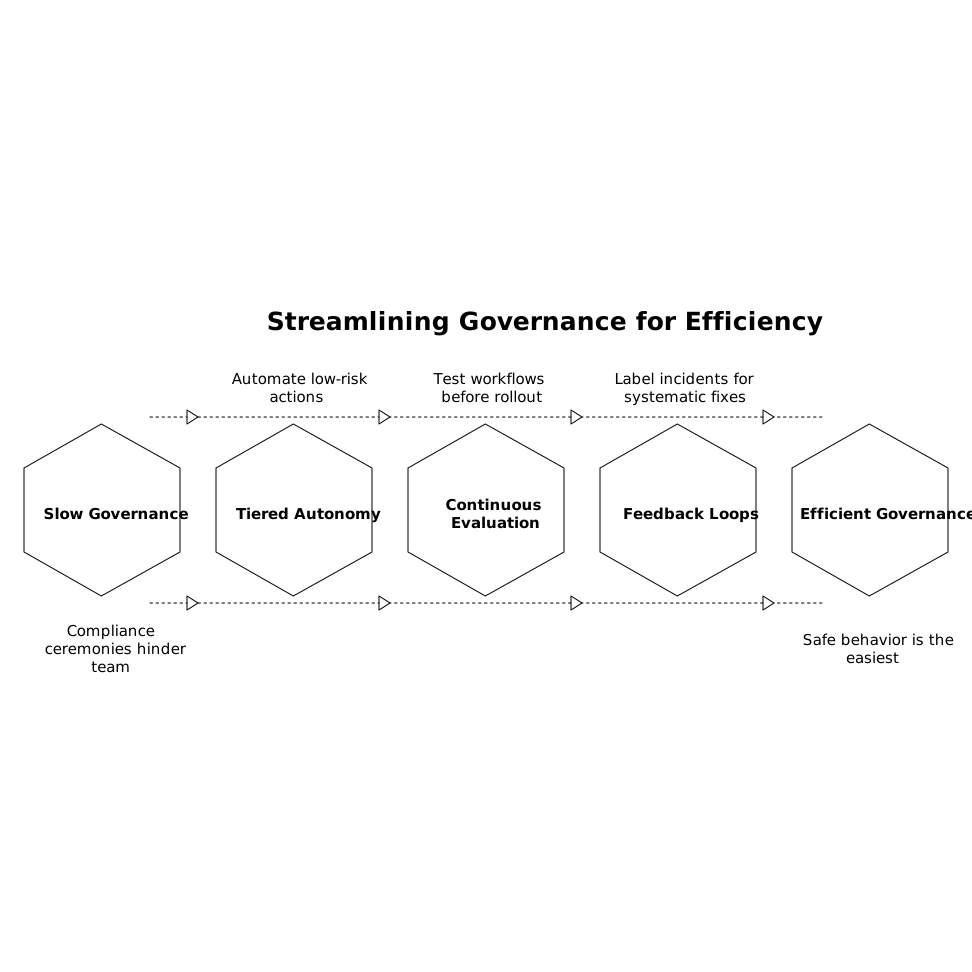
The goal is not to turn every interaction into a compliance ceremony. It’s to establish defaults that make safe behavior the easiest behavior:
- Tiered autonomy: low-risk actions (status checks, address validation) can be automated; high-risk ones (refunds, cancellations) can require approvals or threshold rules.
- Continuous evaluation: run simulations and offline tests on new workflows and policy updates before production rollout.
- Feedback loops: label hallucination incidents by type (knowledge gap vs. tool failure vs. entity mismatch) so fixes are systematic.
When you separate knowledge from actions and audit every tool call, you don’t just reduce hallucinations—you create a system where errors are traceable, reversible where possible, and steadily rarer over time.