Keyboard-first product ops that actually saves time
In most teams, “ticket creation time” doesn’t mean the 20 seconds spent typing a title. It’s the full micro-workflow: deciding where an issue belongs, translating messy input into a standard format, choosing labels and priority, assigning ownership, and getting it in front of the right people. The cost isn’t just minutes—it’s context switching and missed details.
A keyboard-first approach treats issue creation like a production line: predictable inputs, consistent templates, and shortcuts that keep hands off the mouse. When combined with a repeatable triage routine, teams routinely cut the effective time-to-ticket in half—without sacrificing quality.
Design issue templates that reduce thinking, not detail
The purpose of an issue template isn’t to collect more information. It’s to remove decision-making during capture and ensure the minimum useful context is present when the issue gets triaged. The best templates are short, role-aware, and optimized for scanning.
Start with three templates, not ten
Most product ops stacks only need a small set to begin:
- Bug report for defects and regressions
- Feature request for product changes with a clear user outcome
- Ops/Work item for internal chores, migrations, and follow-ups
If you add more, do it because the triage team repeatedly asks the same missing question—not because the category sounds nice.
Make fields scannable and decision-oriented
Template fields should answer, in order:
- What is happening? One-sentence summary that can become the title
- Why does it matter? Impact in user terms (who, how often, how bad)
- How do we reproduce or validate? Steps, expected vs actual, or acceptance criteria
- Where did this come from? Source link (support ticket, Slack thread, call notes)
Keep optional sections truly optional. If a field isn’t used in prioritization, scheduling, or debugging, it’s a candidate to remove.
Write templates for the person filing, not the person building
Engineers may want stack traces; product may want customer context; support may want “fast workaround.” You can satisfy everyone by giving the filer a simple prompt and adding a small “triage addendum” section where the triager can append technical notes later. This prevents over-collection during capture and keeps the workflow fast.
Use shortcut-driven capture to avoid context switching
Issue creation slows down when it requires navigation: hunting for the right project, searching labels, choosing a priority model, then backtracking to add links. The fastest workflows minimize navigation and maximize “inline” entry.
Modern tools like linear.app are intentionally designed around keyboard interactions—quick issue creation, command palettes, rapid assignment, and consistent workflows—so product ops can standardize how tickets enter the system.
Adopt a “capture now, classify in triage” rule
A major time sink is trying to perfect classification at the moment of capture. Instead:
- Capture the issue with a clean title and a completed template.
- Attach the source link immediately.
- Add only one routing signal (for example, a team, component, or inbox label).
Everything else—priority, project, cycle placement—belongs in triage when you have comparative context.
Standardize titles so search works later
A keyboard-first org relies heavily on search, so titles must be predictable. Two practical formats:
- Bug: “[Area] Symptom when condition” (e.g., “Checkout: payment fails when billing ZIP has spaces”)
- Feature: “Enable user to [do X] in [context]” (e.g., “Enable admins to export audit logs by date range”)
This makes duplicates easier to spot and speeds triage because the triager can understand intent without opening the issue.
Create a minimal labeling system that can be applied fast
Labels are helpful until they become a taxonomy project. If applying labels takes longer than writing the issue, the system is upside down. Keep it to a few sets that map to decisions:
- Type (Bug, Feature, Chore)
- Area/Component (limited list; ideally owned)
- Customer impact (None, Low, Medium, High)
If you need more nuance, capture it as text in the template and let reporting evolve later.
Build a triage routine that turns raw tickets into decisions
Keyboard-first operations succeed when triage is routine, fast, and consistent. Without triage, templates and shortcuts just produce a larger backlog.
Define a triage SLA and stick to it
Pick one: same-day, 24 hours, or twice-weekly—then publish it. The goal is to make “when will this be seen?” predictable. If the team can’t meet the SLA, the solution is usually scope control at intake, not more triage meetings.
Use a two-pass triage model
- Pass 1 (30–60 seconds each): validate template completeness, remove duplicates, route to the right team/inbox, request missing info.
- Pass 2 (2–5 minutes each): prioritize relative to existing work, add to the right project/cycle, confirm acceptance criteria, assign an owner.
This structure prevents deep discussion on low-signal tickets and keeps throughput high.
Make duplication detection a first-class step
Duplicates quietly inflate your backlog and waste engineering cycles. During triage, always search by:
- the core noun (“audit logs,” “payment,” “SSO”)
- the symptom (“fails,” “timeout,” “missing”)
- the surface area (“settings,” “checkout,” “mobile”)
If it’s a duplicate, merge context rather than closing with a blunt note. The best triage outcome is one canonical issue with multiple sources attached.
Separate urgency from importance with a simple rubric
To keep triage quick, define a rubric the whole org can use. For example:
- Urgent: production outage, security risk, or revenue-impacting defect
- Important: high-frequency user pain, strategic roadmap item, or compliance requirement
- Neither: polish, edge cases, speculative requests
When the rubric is explicit, triage becomes a mechanical decision instead of a debate.
Operational habits that keep the system fast over time
Run a weekly “template audit” driven by triage friction
Instead of asking “do we like our templates,” look at what slowed triage down last week:
- Which fields were consistently missing?
- Which fields were ignored?
- Which labels were misapplied?
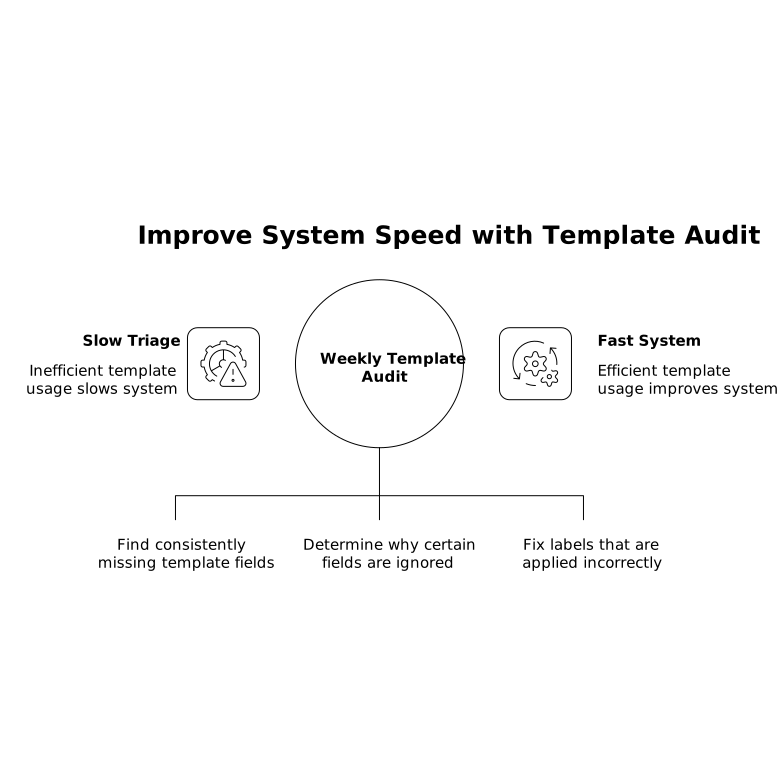
Make one small change at a time. Templates should evolve slowly, based on evidence.
Use an intake inbox to protect planning
One common failure mode is mixing intake with planned work. An intake inbox (or dedicated triage view) keeps new tickets visible without disrupting cycle commitments. This is especially effective when coupled with a strict triage SLA and a “capture now, classify later” rule.
Measure time-to-ticket and time-to-triage, not ticket volume
Ticket count is a vanity metric. What matters operationally is:
- Time-to-ticket: from signal (Slack, support, call) to captured issue
- Time-to-triage: from captured issue to routed/prioritized decision
When these two shrink, teams move faster even if the backlog size stays the same.
Vertical Video