
The human rhythm problem in email warmup
Email warmup is often described as “send a little more each day.” In practice, inbox providers don’t only evaluate how much you send—they evaluate how you send. The “human rhythm” problem is what happens when your outbound pattern looks automated: too regular, too clustered, or too synchronized across mailboxes. Even when volumes are modest, a mechanized cadence can dilute the engagement signals warmup is meant to create.
This matters because Gmail and Microsoft 365 both use behavioral and reputation indicators that extend beyond content and authentication. Send-time variance, distribution across recipients, and how quickly messages trigger engagement all influence whether warmup traffic looks like real correspondence or synthetic activity.
What send-time variance signals to Gmail and Microsoft 365
Send-time variance is the natural irregularity you see in real inbox usage: messages sent at slightly different minutes, uneven gaps between sends, and varied activity across days. In human behavior, even “routine” email doesn’t land at perfectly spaced intervals.
When warmup messages arrive with minimal variance—say, every 10 minutes on the dot, or always within the same narrow window—providers can treat that consistency as a risk marker. The message may still be delivered, but the associated reputation benefit can be weaker than you expect, especially early in a warmup when the system is still forming a baseline about your sender.
Gmail tends to be sensitive to patterns that resemble scripted automation, particularly when multiple accounts exhibit the same rhythm. Microsoft 365 environments, meanwhile, can be more “policy and telemetry” driven—often correlating signals across tenant behavior, mailbox activity, and anomalous send patterns. In both ecosystems, variance helps your traffic look like it belongs.
Micro-batching and why it undermines warmup signals
Micro-batching is the habit of sending warmup emails in tight clusters—e.g., 20 messages in a two-minute span—followed by long silence. It usually happens when tools schedule warmup “jobs,” when APIs queue sends, or when a user triggers a campaign and warmup gets appended as an afterthought.
The deliverability issue is not only the burst itself; it’s what the burst implies:
- Uniformity across recipients: many mailboxes receive near-identical timing, which is unlike organic conversation.
- Engagement timing distortion: if opens and replies also happen in a tight window, the full loop looks coordinated.
- Queue artifacts: batches can create repeated headers, similar routing behavior, and consistent latency profiles.
Warmup is supposed to generate positive engagement signals (opens, replies, inbox placement, and spam recovery actions). Micro-batching can reduce the credibility of those signals because it compresses a day’s worth of “human” behavior into a few minutes.
Warmup signals are more than opens and replies
Marketers often over-focus on open and reply counts. In reality, warmup signals are a bundle of behaviors that collectively communicate legitimacy. Across Gmail and Microsoft 365, the strongest warmup profiles tend to include:
- Natural send distribution: not perfectly periodic, not excessively clustered.
- Realistic conversation depth: occasional multi-message threads, not just one-and-done pings.
- Inbox interactions: reading, replying, occasionally moving mail (including spam recovery).
- Consistency over time: steady behavior across weekdays with modest variation.
In other words, the provider isn’t only asking “Did someone open?” It’s asking “Does this resemble the way normal accounts communicate?” That’s where human rhythm becomes a differentiator.
Gmail versus Microsoft 365: where the rhythm shows up differently
Gmail patterns and clustering sensitivity
Gmail’s filtering and reputation systems tend to respond strongly to behavioral footprints at scale. When a sender (or set of senders) produces highly consistent send times or synchronized activity across multiple mailboxes, that pattern can become part of the reputation narrative—especially during the fragile early warmup phase. This is why “same time every day” warmups can plateau: the engagement is there, but the pattern is too neat.
Microsoft 365 and organizational telemetry
Microsoft 365 often operates in contexts where security policies, tenant-level controls, and anomaly detection are front and center. Warmup that looks like a scripted system—bursty sends, identical cadence across mailboxes, or repeated timing fingerprints—can be less effective because it does not match the heterogeneous activity typical inside real organizations. The goal is not to “hide,” but to behave plausibly.
How to design a warmup cadence that looks human
Solving the human rhythm problem is less about randomization for its own sake and more about building a send-and-engage loop that mirrors authentic email usage. Practical guidelines:
- Spread sends across the day: use multiple windows rather than a single burst.
- Introduce jitter: avoid exact intervals; vary minutes and gaps naturally.
- Limit synchronization across mailboxes: if you warm multiple inboxes, avoid identical schedules.
- Maintain realistic thread behavior: replies should not always arrive instantly; mix short and longer delays.
- Avoid sudden step-changes: scale gradually, but also keep the shape of sending consistent (no weekday spikes that look like automation).
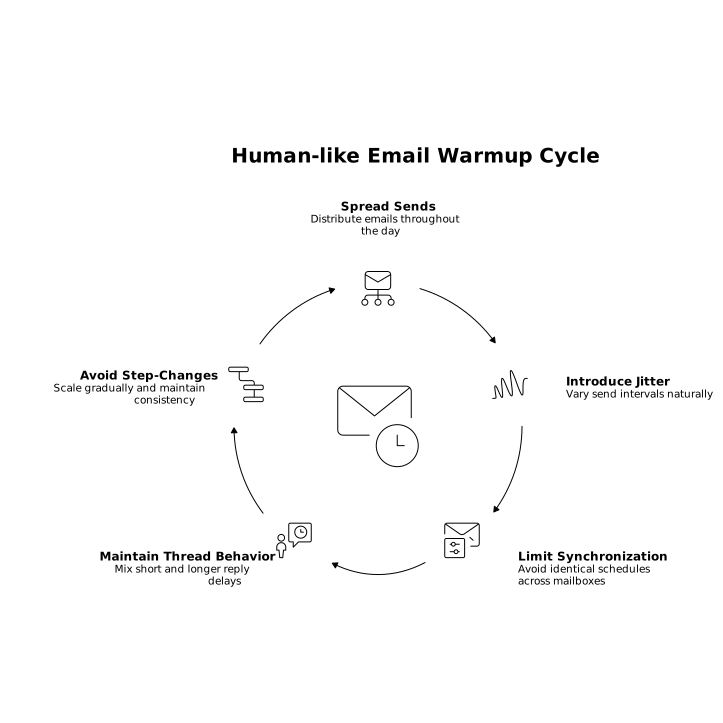
These practices are especially important if you’re warming a domain with multiple new mailboxes, where patterns can inadvertently line up and create a “factory rhythm.”
Where tooling helps and what to look for
Manually managing variance is difficult: humans are bad at being “naturally inconsistent” on purpose, and operational constraints (time zones, campaign windows, team routines) push you toward repetitive scheduling. Deliverability platforms can help by orchestrating behavior across accounts, preserving variance, and ensuring the engagement loop remains believable.
mailwarm approaches warmup as a behavioral simulation problem, not just a volume ramp. By generating authentic engagement signals—opens, replies, and spam recovery actions—through a network of real inboxes, it’s designed to support reputation building at the domain, IP, and mailbox level while maintaining more natural-looking activity across providers like Gmail and Microsoft 365.
Operational checkpoints to catch micro-batching before it hurts
If you suspect your warmup is too “clean,” audit the pattern like a provider would. A few concrete checks:
- Timestamp clustering: do most warmup sends land within a narrow 5–10 minute band?
- Identical daily schedule: are you sending at the same minute every day?
- Reply latency uniformity: do replies consistently arrive after the same delay?
- Cross-mailbox synchronization: do multiple mailboxes send bursts simultaneously?
Fixing these issues typically improves more than warmup outcomes. It also makes your ongoing sending program more resilient when you transition from “warming” to real outreach, where inbox providers continue to evaluate your behavioral footprint over time.
A warmup that scales without losing credibility
The hidden risk in many warmup plans is that they scale volume while preserving the same mechanical rhythm. The better approach is to scale volume and preserve human-like variance. When warmup activity resembles genuine correspondence—distributed, imperfect, and interaction-rich—the positive signals you generate are more likely to strengthen reputation in a way that holds up across Gmail and Microsoft 365.
Vertical Video