Why feature flags need a decision tree, not a checklist
Feature flags are often treated as a simple “on/off” mechanism. In practice, they’re a release control system with multiple stakeholders, multiple environments, and multiple failure modes. The gap shows up when a team can ship behind a flag but can’t answer basic questions under pressure: “Are we safe to enable this for 5%?”, “Who flips it back if conversion drops?”, “What if the queue backs up?”, “Which flag is still live three months later?”
A release readiness decision tree makes those answers explicit. It turns flags into a predictable flow: criteria to progress, measurable guardrails, clear rollback paths, and owner hand-offs at each stage. The outcome isn’t only fewer incidents—it’s faster, calmer releases.
Model the flag as a controlled experiment with explicit exit ramps
A useful decision tree starts by acknowledging that enabling a flag is an operational act, not merely a deploy-time choice. Define the flag type first, because the tree branches differently depending on risk:
- Kill switch: can disable a risky pathway immediately (fast rollback, minimal dependencies).
- Gradual rollout: percentage-based or cohort-based exposure over time.
- Permission or entitlement: tied to plans, accounts, or roles (slower rollback because it can affect contracts).
- Ops / maintenance: toggles for backfills, migrations, background tasks (rollback may be “stop” rather than “undo”).
From there, the tree should encode two ideas: every “go forward” step has a “go back” step, and every toggle has an accountable human owner at the moment it matters.
Build the release readiness decision tree
Step 1: Pre-flight readiness gate
Before the flag can exist in a production config, require a small set of non-negotiables:
- Owner and on-call mapping: a named owner (usually engineering) plus a backup and the escalation channel.
- Blast radius definition: what happens at 1%, 10%, 100%? Which users or regions are first?
- Success and failure metrics: define leading indicators (errors, latency) and business metrics (activation, conversion) with thresholds.
- Observability hooks: dashboard and alert links included in the flag description or runbook.
- Timebox and cleanup plan: the date the flag must be removed or converted to config.
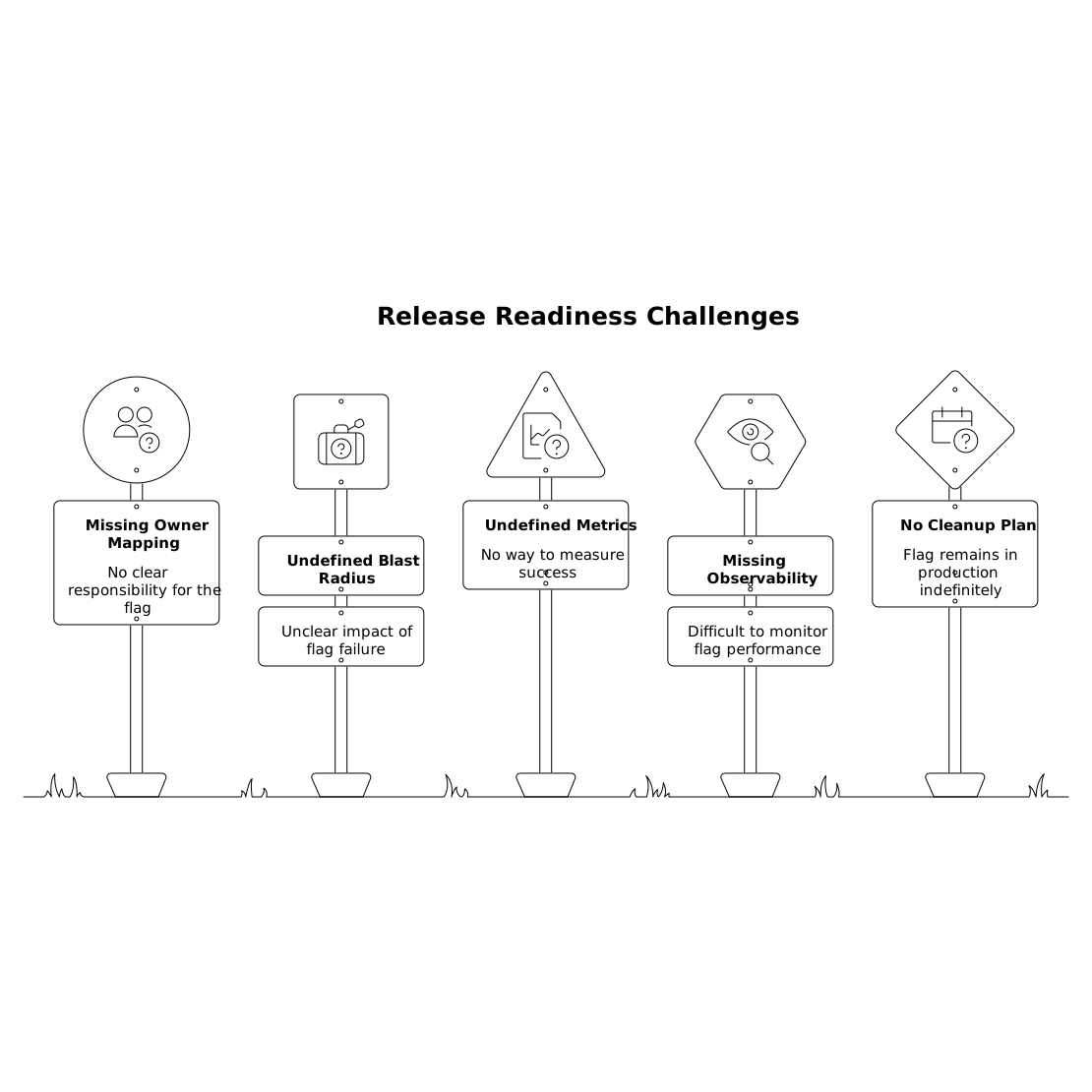
If any item is missing, the tree should route to “block release” rather than “ship and hope.”
Step 2: Environment progression and data integrity checks
Once pre-flight passes, move through environments with a consistent decision pattern:
- Dev/staging: is the feature testable end-to-end with realistic data shapes?
- Canary production: does it behave under production traffic characteristics?
Many flag failures aren’t logic bugs—they’re repeated side effects when retries happen. If your feature triggers events, webhooks, billing operations, or asynchronous work, add an explicit decision node for idempotency and retry behavior. A practical companion pattern is to use idempotency keys, bounded retries, and dead-letter queues so the “rollback” path doesn’t leave duplicated actions behind. If you need a deeper reliability model for this branch, the approach in Reliable Event-Driven No-Code Frontends With Idempotency Keys, Retries, and Dead-Letter Queues is directly applicable.
Step 3: Progressive delivery gates
This is the core of the tree: how you decide to expand exposure.
- Enable for internal users → proceed only if error rate, p95 latency, and key workflow completion stay within bounds.
- Enable for a small cohort (1–5%) → proceed only if both technical and business guardrails are stable for a defined window.
- Expand to 10–25% → proceed only if support tickets and anomaly alerts remain normal.
- Expand to 50–100% → proceed only if the rollback mechanism is still available (no irreversible migrations without a backout).
The tree should explicitly state the observation window at each step (for example, “two hours for latency regressions” vs. “two days for conversion effects”). Avoid a one-size-fits-all window.
Define rollback paths that match real failure modes
A rollback isn’t always “turn flag off.” For each major risk, define the rollback that actually restores safety:
- Technical regression (errors, latency): flip the kill switch immediately; optionally reduce exposure to 0% and disable background jobs.
- Data shape mismatch: stop writes first, then reads; route to “safe mode” view; run a repair job if needed.
- Behavioral or UX regression: revert cohort exposure, keep internal testing enabled, and open a product incident review.
- Third-party dependency issues: fall back to cached/stubbed behavior, apply circuit breakers, then reduce rollout.
Rollback paths should be written as a runbook: what to change, where to change it, who is allowed to change it, and what “recovered” means. The decision tree should link to that runbook, not rely on tribal memory.
Make owner hand-offs explicit and low-friction
The fastest way to break a rollout is an ambiguous hand-off: engineering thinks product is watching metrics; product thinks engineering is on rollback duty; support is surprised by the change; marketing updates a page too early.
In a good decision tree, each stage has a hand-off rule:
- Engineering → Product at “metrics are stable, ready to expand cohort.” Product approves exposure changes tied to user experience and business goals.
- Product → Support before exposure increases meaningfully. Support gets a short “what changed” and “how to recognize issues.”
- Engineering → Incident commander if any threshold triggers. One person owns the timeline; others execute tasks.
If your team works in pairs or rotations, treat the hand-off like a formal control transfer: a quick verbal/written state summary, who is driving the next action, and which dashboards are being watched. The operating discipline described in The Control Handoff Playbook for Frictionless Driver and Navigator Swaps in Remote Pair Programming adapts well to rollout ownership changes.
Turn the decision tree into a visual artifact teams actually use
A decision tree fails if it lives in a long doc no one opens during a release. Teams adopt it when it’s visible and editable.
This is where a text-to-visual workflow helps: you can write the stages, gates, and rollback branches as plain language, then render it into a clean diagram for the runbook. Tools like napkin.ai are well-suited to this because they convert structured text into diagrams you can refine—useful when the tree evolves after incidents or after the first few rollouts.
Keep the diagram tight: one page, legible nodes, links out to dashboards and runbooks, and a clear legend for “gate,” “owner,” and “rollback.”
Operational hygiene to prevent flag debt
The final branch of the tree should answer: “What happens when it’s done?” Flag debt is real: old flags complicate testing, create hidden code paths, and make incidents harder to debug.
- Graduation: once at 100% and stable, remove the flag from code, not just set it permanently on.
- Expiry enforcement: flags auto-alert as they approach the cleanup date.
- Audit: a monthly review of active flags, owners, and user impact.
A release readiness decision tree ends where the system becomes simpler again. That’s the real measure of maturity: not just shipping safely, but leaving fewer traps behind.