The alias trap hides in plain sight
Email warmup relies on one thing more than most teams realize: consistent identity signals. Not just SPF, DKIM, and DMARC alignment, but the human-facing identity that recipients see and act on. A subtle mismatch between the visible From display name and the Reply-To address can quietly distort engagement signals—especially in Gmail and Microsoft 365—where warmup success depends on believable opens, replies, and “this is wanted” behaviors.
This is the alias trap: messages look like they came from one person or brand, but replies route somewhere else. Sometimes it’s accidental (a leftover Reply-To from an old tool), sometimes intentional (routing replies to a shared inbox), but in both cases it can break the behavioral pattern mailbox providers use to evaluate whether the conversation is authentic.
What “identity consistency” really means during warmup
Warmup is not a purely technical checklist. Authentication is table stakes; engagement is the differentiator. The underlying assumption behind warmup is that a mailbox behaves like a normal sender: it has a stable name, a stable address, and it receives replies at the same identity it uses to send.
When a mailbox provider observes that recipients reply but the reply is routed to a different identity, you lose the clean feedback loop. The message may still “get replies” in a literal sense, but the ecosystem signal is muddy: the visible sender is not the conversational endpoint.
Two identities, one message
Most recipients don’t think in headers; they think in people. If the From name says “Jordan at Acme” but the Reply-To routes to “support@acme.com” or “jordan+replies@vendor-mailbox.com,” the message reads like an alias or a mask. That can change how users behave (they may not reply, may forward, or may ignore), and it can change how clients thread and classify the conversation.
How Gmail and Microsoft 365 interpret the mismatch
Neither Gmail nor Microsoft 365 publishes a single rule that says “From name must match Reply-To.” The problem is more practical: their systems infer legitimacy from many weak signals at once. A mismatch introduces friction into multiple areas at the same time.
Threading and conversational continuity
Warmup engagement signals are strongest when the interaction looks like a two-way conversation. If replies don’t land back in the same mailbox identity that sent the message, you can end up with broken threads, fragmented conversations, or replies that appear detached from the sender in the UI. In Microsoft 365 especially, organizational routing rules and shared mailboxes can make this worse by shifting replies into a different handling context than the original sender.
User-level trust cues
Gmail and Outlook both surface trust hints to users (avatar consistency, name/address familiarity, conversation history). A From name that implies one identity while Reply-To routes elsewhere can reduce the “this is a normal conversation” feeling. During warmup, you want recipients (even warmup network recipients) to behave naturally—open, read, reply, and keep the exchange in the inbox—without oddities that trigger skepticism.
Engagement attribution becomes less clean
Warmup is partly about establishing a repeatable pattern: send from a mailbox, receive replies to that mailbox, and sustain a stable engagement loop. When replies go to another place, the mailbox provider may not associate the positive engagement as strongly with the sender identity you are trying to build up.
Common ways teams fall into the alias trap
These mismatches rarely come from one dramatic mistake. They come from “reasonable” operational shortcuts that add up.
1) Using a shared inbox Reply-To for outbound mailboxes
Sales or outreach teams often set Reply-To to a shared inbox to centralize responses. Operationally, it’s convenient. For warmup, it can be counterproductive: you’re training providers that the mailbox is a sender but not a conversational endpoint.
2) Rotating display names while keeping the same mailbox
Some teams A/B test sender names (“Alex from Acme,” “Alex,” “Acme Team”) while the underlying mailbox stays constant. This creates identity instability. Even if Reply-To matches the From address, the display name churn can reduce familiarity. If Reply-To also differs, the instability is amplified.
3) Old automation defaults that linger
Legacy CRM templates, older outreach tools, and helpdesk integrations often set Reply-To automatically. If you later switch providers or add warmup, that Reply-To can remain in the template unnoticed.
How to audit and fix mismatches without losing workflow
You can keep operational routing needs without sacrificing warmup identity consistency. The goal is to preserve a clean, believable sender identity during warmup, then introduce complexity gradually once reputation is stable.
Step 1: Decide what the “real identity” is
Pick a single mailbox identity for warmup: one sending address and one display name that will stay stable. Treat it like a real person’s inbox. If you need a team persona, still keep it consistent (“Acme Partnerships” with a stable address).
Step 2: Align Reply-To with the sending mailbox during warmup
During the warmup phase, the safest approach is: replies should return to the same mailbox that sent the message. That ensures clean conversational loops and consistent threading behavior. If you must monitor replies centrally, use mailbox delegation, shared access, or server-side journaling rather than changing Reply-To.
Step 3: Keep display name stable and realistic
Use a display name that matches how a human would send mail in your organization and keep it unchanged for weeks, not days. Avoid novelty (“Acme Growth Rocketship”) and avoid frequent toggles between “First name” and “Company Team.” Consistency is the asset.
Step 4: Check DMARC alignment, but don’t stop there
A mailbox can pass DMARC and still struggle with inbox placement if engagement signals look unnatural. If you’re troubleshooting “authentication passes but spam happens,” it often helps to separate technical compliance from behavioral reputation building. The deeper mechanics are covered in Why DMARC Pass Still Sends Email to Spam and How Warmup Signals Restore Trust.
Where warmup platforms help and where they can’t
Warmup platforms can generate realistic engagement patterns—opens, replies, and inbox interactions—at a cadence that looks human. But they can’t fix identity confusion created by your own headers. If the message goes out with a misaligned display name and Reply-To, the warmup activity may be less effective because the conversation endpoint isn’t stable.
This is why teams that care about deliverability treat warmup as both an automation problem and a configuration discipline problem. A platform like mailwarm can reliably simulate authentic engagement across major providers, but it performs best when the sender identity is coherent: the mailbox sends as itself and receives replies as itself.
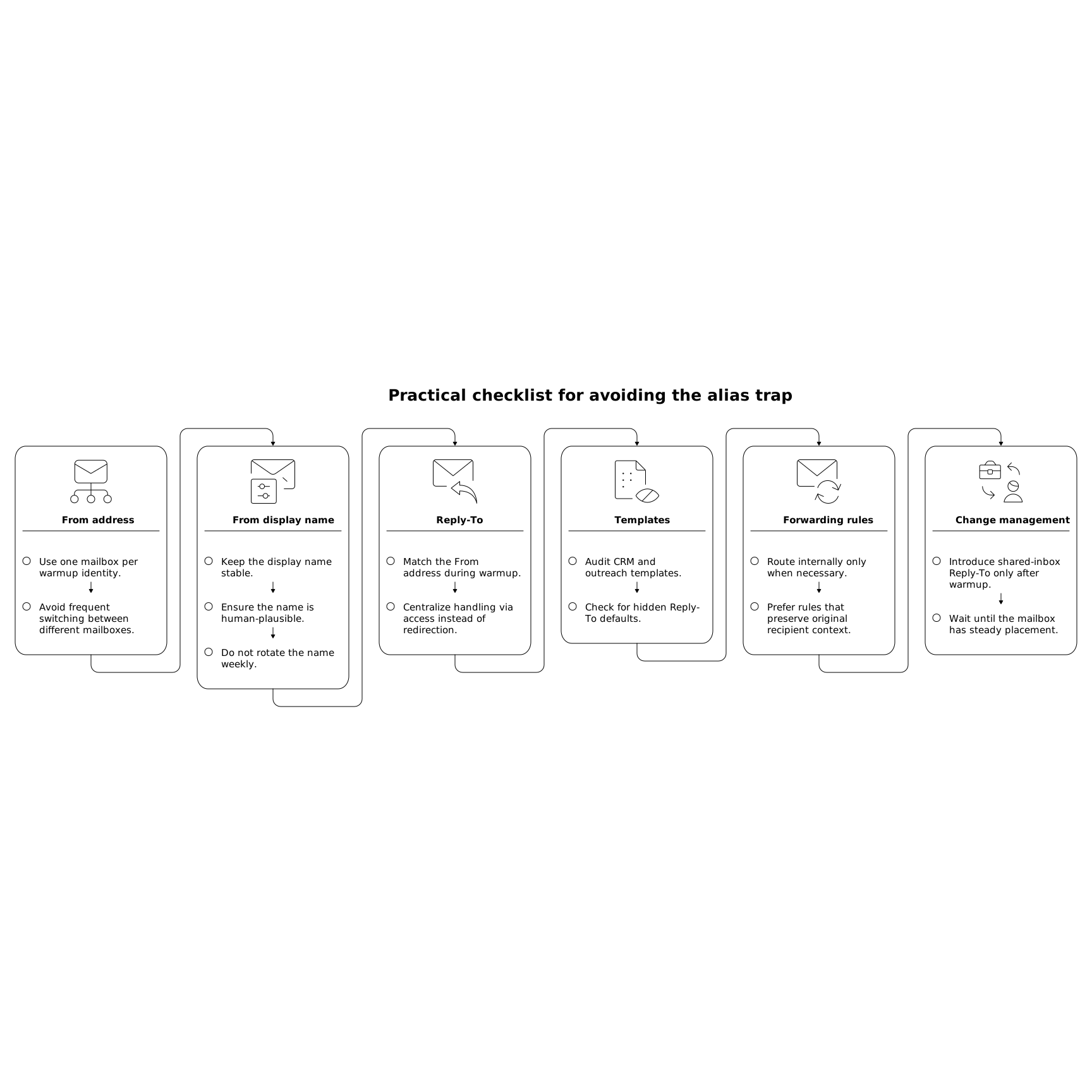
Practical checklist for avoiding the alias trap
- From address: one mailbox per warmup identity (avoid frequent switching).
- From display name: stable and human-plausible; don’t rotate weekly.
- Reply-To: match the From address during warmup; centralize handling via access, not redirection.
- Templates: audit CRM/outreach templates for hidden Reply-To defaults.
- Forwarding rules: if you must route internally, prefer rules that preserve the original recipient mailbox context.
- Change management: introduce shared-inbox Reply-To only after the mailbox has established steady inbox placement.
When this issue shows up as “warmup isn’t working”
The most frustrating part is that nothing looks obviously broken. Messages send. Some replies happen. Yet inbox placement stays inconsistent or improves slowly. If you’re running warmup and results plateau, check identity continuity before you change volume, copy, or sending schedule.
Because the trap is quiet, it’s often misdiagnosed as “Gmail is strict” or “Microsoft 365 throttles new senders.” Those can be true, but a mismatched From/Reply-To setup is a fixable self-inflicted variable—and it’s one of the few that can undermine engagement signals even when everything else looks correct.