Build a Wrong Answer Pattern Map Instead of an Error Log
Most Digital SAT “error logs” fail for a simple reason: they ask you to write too much, too often. A Wrong Answer Pattern Map is a lighter weekly drill—about 20 minutes—that still captures the signal you need: the repeat traps you keep falling for across Reading and Writing and Math. It’s not a journal of every miss. It’s a map of your most common wrong-answer moves, organized so you can spot them quickly and practice against them.
This matters on the Digital SAT because the test is modular and adaptive: patterns show up as families of decisions (misreading a constraint, chasing a tempting transition, over-trusting a familiar formula), not as isolated mistakes. A map helps you train those decisions.
What a Wrong Answer Pattern Map Looks Like
Think of a one-page dashboard you can keep in Notes, Google Docs, or a simple table. It has only four sections:
- Pattern name (short and memorable)
- Trigger (what you see in the question that predicts the trap)
- Your wrong move (the specific thing you did)
- Counter-move (a one-line rule to do next time)
You only add a few patterns at a time—typically the top 3–6 that show up repeatedly. Everything else is noise.
The 20-Minute Weekly Drill
Minute 0–3: Pull a small, recent sample
Use the last week of practice (or your most recent timed module). You only need:
- 6–10 missed questions, or
- 4–6 missed + 4–6 that felt “iffy” (guesses, slow solves, changed answers)
Including “iffy” items is crucial—your future wrong answers often hide there.
Minute 3–10: Tag each miss with a trap label
For each question, don’t re-solve yet. First, label the type of wrong decision. Keep labels consistent week to week. Examples that translate well across question types:
- Constraint drop: ignored “except,” “must be,” units, domain, or a condition.
- Half-read evidence: latched onto one word/phrase and skipped the full support.
- Choice-first reasoning: tried to justify an option instead of predicting the answer.
- Overgeneralized rule: applied a grammar or math rule without checking fit.
- Speed tax: rushed the last step (sign, arithmetic, punctuation, inequality direction).
A good label should feel like a “behavior,” not a topic. “Quadratics” is not a behavior. “Picked the first factor that looked right and didn’t verify” is.
Minute 10–16: Count and promote your top 2–3 patterns
Make a quick tally. Circle the two or three labels that happened most. Those become this week’s “active patterns” on the map.
If everything is scattered, that’s still a pattern: it may indicate low consistency under time. In that case, choose one process pattern (like Constraint drop) and one pacing pattern (like Speed tax).
Minute 16–20: Write a counter-move and a micro-drill
Each active pattern gets:
- Counter-move rule (one sentence you can execute)
- Micro-drill (2–5 minutes you can repeat during the week)
Micro-drills are what makes the map useful. They convert insight into repetition.
Pattern Examples Across Digital SAT Question Types
Reading and Writing traps
- Pattern: “Transition temptation”
Trigger: The sentence needs a connector (however/therefore/moreover).
Wrong move: Choose the transition that matches tone, not logic.
Counter-move: Identify the relationship in two words (contrast/cause/add).
Micro-drill: Do 6 transition questions and write the relationship before looking at choices. - Pattern: “Grammar rule autopilot”
Trigger: Underlined punctuation around clauses or lists.
Wrong move: Apply a rule (comma splice, colon, dash) without testing structure.
Counter-move: Determine whether each side can stand alone as a sentence.
Micro-drill: For 5 questions, rewrite the sentence with no punctuation, then add the correct mark.
Math traps
- Pattern: “Unit drift”
Trigger: Rates, percent change, geometry measures, or word problems with labels.
Wrong move: Solve correctly but report the wrong unit or scale.
Counter-move: Write the unit next to the final answer before selecting.
Micro-drill: Do 6 word problems and circle the unit asked in the last line. - Pattern: “Algebra without verification”
Trigger: Equations/inequalities with solutions that can be checked quickly.
Wrong move: Stop at a clean-looking value and move on.
Counter-move: Plug back in once, especially when squaring or dividing by variables.
Micro-drill: For 5 problems, force a 10-second plug-in check even if you feel confident.
How to Use the Map During the Week
The map is not something you admire on Sunday; it’s something you glance at before practice. Here’s a simple cadence:
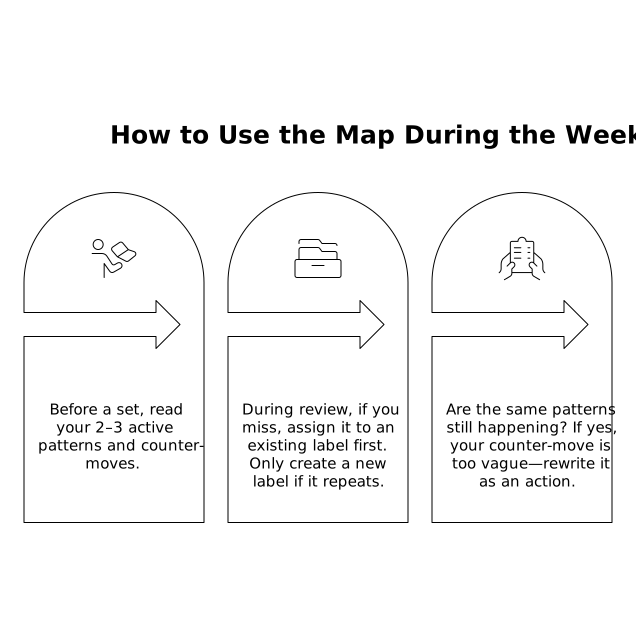
- Before a set (30 seconds): Read your 2–3 active patterns and counter-moves.
- During review (2 minutes): If you miss, assign it to an existing label first. Only create a new label if it repeats.
- Midweek check (5 minutes): Are the same patterns still happening? If yes, your counter-move is too vague—rewrite it as an action.
Subtle Tech Assist Without Turning It Into Homework
Apps that already track performance can make this easier because you can pull a recent set and look for repeat behaviors fast. For example, getsharp pairs targeted practice with step-by-step explanations, which is useful for turning a pattern into a micro-drill: you can focus on a single skill cluster, then use the explanation to pinpoint the exact decision that went wrong (constraint missed, logic relationship misread, verification skipped).
If you want the map to stay lightweight, keep your “pattern notes” separate from long written solutions. The explanation is your reference; the map is your operating system.
A Simple Template You Can Copy
Use a table with 3–6 rows max:
- Pattern name: ________
- Trigger: ________
- My wrong move: ________
- Counter-move: ________
- Micro-drill (2–5 min): ________
After two to three weeks, you should see old patterns shrink and new ones emerge. That’s progress: your mistakes are getting more specific, and your decisions are getting more disciplined.