
Interruptions don’t just steal minutes
A “quick ping,” a production fire, a surprise meeting invite—these aren’t only time losses. They are context losses. The real damage is the cognitive tax you pay to remember what mattered, what was next, and what you already decided. The Calendar Reload Protocol is a tight 12-minute workflow you run immediately after an interruption to rebuild the day you meant to have—without trying to “catch up” by force of will.
This protocol assumes something simple: your calendar is the most honest record of what can still happen today. When you use it as the control surface for tasks, notes, and priorities, recovery becomes mechanical instead of emotional. That’s where an integrated workspace like Routine fits naturally: one place to re-anchor the plan, re-attach tasks to time, and capture the thread you were holding before the switch.
The Calendar Reload Protocol in 12 minutes
Think of the protocol as three loops—stabilize, re-orient, and re-commit. Each loop is short on purpose. You’re not redesigning life; you’re reloading the operating state of the day.
Minute 0–2: Stabilize the situation and stop the bleed
Right after an interruption, your brain keeps trying to solve the last thing it saw. Before you even look at your tasks, you need a hard stop.
- Close the loop you can close. If the interruption is finished, mark it done in whatever minimal way you track work.
- If it’s not finished, park it. Write a one-line “parking note” that captures the state: what’s true, what’s blocked, and the next action. This prevents re-reading threads later.
- Set a boundary for re-entry. Decide: am I returning to the original work now, or after a scheduled block? If you don’t choose, the interruption chooses for you.
The key is to avoid the half-open mental tab. Two minutes is enough to turn chaos into an object you can schedule.
Minute 2–5: Rebuild the day from the calendar outward
Now open today’s calendar view. Don’t start with a to-do list. Lists are infinite; the day isn’t.
- Scan what’s fixed. Meetings, hard deadlines, and any immovable obligations.
- Identify the next “real” working window. The first block of uninterrupted time you can plausibly protect.
- Check the edges. Look for hidden time leaks: a meeting that ends at :30 but requires a 10-minute note wrap-up, a commute buffer, a handoff message you always forget.
This step is where time blocking becomes less a “productivity technique” and more a recovery system. If you’re already time blocking, the calendar tells you what is still possible. If you aren’t, it tells you what you’ve been pretending is possible.
Minute 5–8: Choose a single priority lane for the next 90 minutes
After context switching, many people try to restore control by creating a longer list. That backfires: you get the feeling of planning without the reality of execution.
Instead, choose a lane for the next 60–90 minutes. A lane is a category of work that shares context:
- Deep build: design, coding, writing, analysis
- Operational: follow-ups, scheduling, status updates, review queues
- Coordination: messages, handoffs, stakeholder alignment
Pick one lane that best matches the next working window you identified. Then pick one primary outcome inside that lane. If you’re unsure, use this rule: choose the outcome that reduces future interruptions (e.g., clarifying requirements, unblocking someone, shipping a small fix).
Minute 8–10: Convert the outcome into a calendar-backed sequence
This is the conversion step: turning intention into scheduled reality.
- Write the “next three actions.” Not a project plan—three concrete actions you can start without rethinking. Example: “Open PR, respond to two review comments, rerun tests.”
- Attach actions to time. Put the primary outcome into the next available block on the calendar. If you can’t find time, you’ve discovered the truth: something must move.
- Place a 5-minute “reset buffer” after. This is where you capture notes, send a handoff message, and decide what’s next. It prevents the next interruption from wiping the work you just did.
In an integrated calendar-task-notes workspace, this step stays clean because you aren’t bouncing between tools to schedule, capture, and execute. You can anchor the plan where the time actually lives.
Minute 10–12: Protect the next block with a lightweight communication pass
The fastest way to lose the rebuilt day is to leave doors open for new pings. Spend two minutes reducing inbound noise.
- Send one proactive message if needed: “Back at 2:00, will update then.” This prevents follow-up chasers.
- Silence what you can. Close extra tabs, mute the channel for a short window, or set a brief status.
- Confirm the first action. End the 12 minutes with the first click you’ll make for the work itself (open the doc, open the repo, open the ticket). This removes the last friction point.
What makes this protocol work when you’re already behind
The Calendar Reload Protocol is designed for reality: when the day is already compromised. It works because it avoids two common traps.
Trap 1: Trying to “recover” by accelerating
Speed without orientation increases mistakes, which creates more interruptions. The protocol restores orientation first—then commits.
Trap 2: Treating tasks as independent of time
Most overwhelm comes from mixing “what matters” with “what fits.” By making the calendar the source of constraints, you stop promising yourself imaginary hours.
How to make the reload automatic inside your daily system
You’ll get the best results when the protocol becomes a default response, not a heroic effort. Three practices help:
- Create a reusable template note called “Reload” with headings: Parking note, Next window, Lane, Outcome, Next 3 actions.
- Use a consistent time block name like “Reload (12m)” so it’s easy to drop into the calendar after a disruption.
- Standardize handoffs so interruptions don’t multiply. If you work in pairs or rotate ownership, a structured swap reduces context thrash—this aligns well with practices described in control handoff playbooks for remote pair programming.
For product and engineering teams, the same logic applies beyond the individual: fewer ambiguous states means fewer interruptions. If you’re seeing repeated “fire pings” caused by fragile integrations, strengthening your safety nets (for example, through contract testing across services) reduces the number of emergencies that trigger a reload in the first place.
A simple standard for measuring whether it’s working
You don’t need elaborate metrics. Track just two signals for a week:
- Time-to-restart: how long it takes you to do the first meaningful action after an interruption.
- End-of-day residue: how many “open loops” you carry into tomorrow.
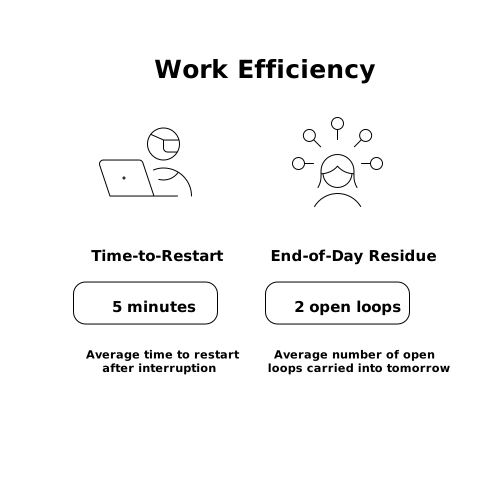
If the protocol is working, time-to-restart shrinks and residue declines—even if interruptions stay constant. That’s the point: you can’t control the pings, but you can control the reload.